
The tech world moves fast, and in 2026, the iPhone 17 has solidified its place as a powerhouse of mobile computing. With its ultra-efficient A19 Pro chip and the stunning Tandem OLED display, it is a device we rely on for everything from high-stakes business calls in Downtown Dubai to capturing 8K cinematic footage at the beach. However, even the most advanced smartphone is essentially a paperweight if it cannot draw power. If you find yourself wiggling your cable or noticing that your battery percentage isn’t budging, you are likely facing the need for an iPhone 17 charging port repair.
Living in the UAE presents a unique set of challenges for high-end electronics. The fine desert sand, the high humidity, and the intense heat can all wreak havoc on the delicate USB-C 3.5 port of the iPhone 17. Unlike older models, the charging assembly in 2026 is a highly integrated component that handles not just power, but high-speed data transfer and DisplayPort output. This guide explores why these ports fail, how to identify the signs of trouble, and why professional intervention is the only way to ensure your flagship device stays healthy.
The Evolution of the iPhone 17 USB-C Port
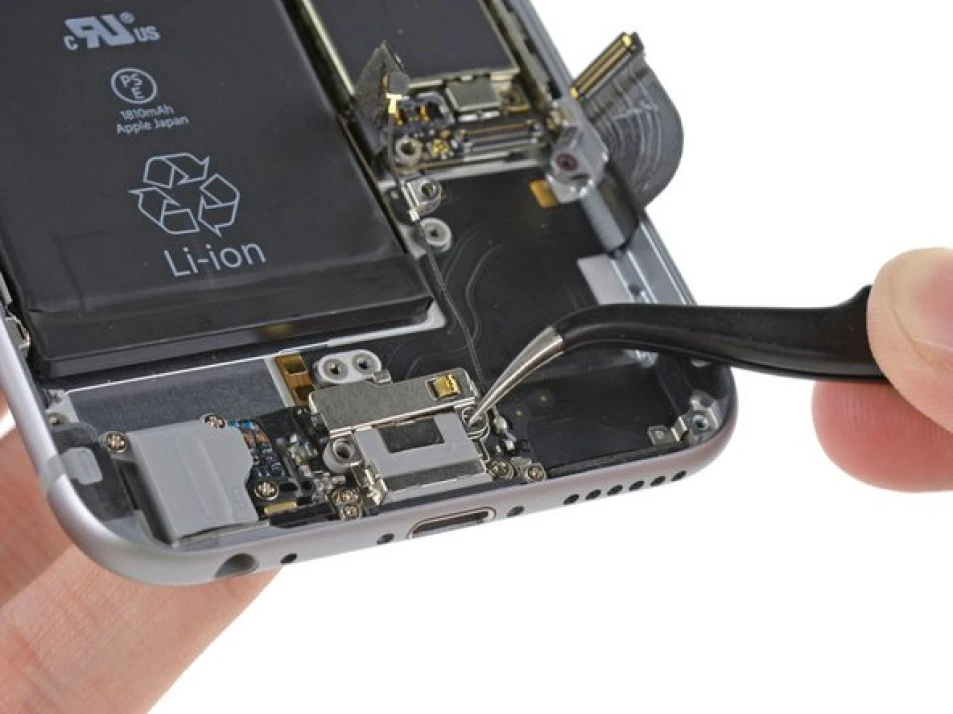
To understand the complexity of an iPhone 17 charging port repair, we have to look at how Apple has engineered this specific part. The iPhone 17 utilizes a reinforced USB-C housing designed for the high-wattage requirements of 60W fast charging.
High-Speed Data and Thermal Management
In 2026, the charging port is no longer just a passive “plug.” It contains its own dedicated controller chip that manages thermal levels during rapid charging. If the port gets too hot a common occurrence in the Dubai summer the chip will “throttle” the power intake. Over time, constant thermal expansion and contraction can cause the microscopic solder joints connecting the port to the logic board to weaken or crack.
The Impact of the 2nm Architecture
The A19 Pro chip is built on a 2nm process, making it incredibly sensitive to voltage fluctuations. A dirty or damaged charging port can cause “arcing” tiny electrical sparks that occur when a connection is loose. These sparks can send irregular voltage spikes into the device, potentially damaging the expensive internal silicon. This is why addressing a loose port is an urgent matter of hardware safety.
5 Signs Your iPhone 17 Port Needs Professional Help
How do you distinguish between a bad cable and a failing hardware port? Before you search for an iPhone 17 charging port repair, check for these specific symptoms.
- The “Sweet Spot” Requirement: If your phone only charges when the cable is tilted at a specific angle, the internal pins of the USB-C housing are likely bent or worn out.
- Slow Charging Warnings: If your iPhone displays a “Slow Charger Detected” message even when using a genuine Apple 60W brick, the data pins inside the port are likely corroded, preventing the phone from “handshaking” with the charger.
- Physical Debris “Crunch”: If the cable doesn’t “click” into place or feels “spongy” when pushed in, there is likely a buildup of compressed pocket lint or Dubai sand inside the port.
- Noisy Connection: If you hear a faint crackling sound or see a “Liquid Detected” alert that won’t go away even when the phone is dry, the internal sensors are malfunctioning.
- Intermittent Data Transfer: If your iPhone connects to power but won’t be recognized by your MacBook or car for CarPlay, the high-speed data traces inside the port assembly have failed.
Why DIY Repairs are Risky for iPhone 17
It is tempting to grab a toothpick or a needle to clean out a port, but in 2026, this is a recipe for disaster.
The Sensitivity of USB-C Pins for iPhone 17 charging port repair
Unlike the old Lightning ports, USB-C has a central “tongue” with dozens of microscopic pins on both sides. These pins are incredibly fragile. Using a metal tool like a needle can easily short-circuit the power pins to the data pins, potentially killing the charging IC (Integrated Circuit) on your logic board.
Component Pairing and Calibration for iPhone 17 charging port repair
Apple has increased its “System Configuration” requirements this year. The iPhone 17 charging assembly is cryptographically paired with the motherboard. If you replace the port with a low-quality third-party part, the phone may disable fast charging or refuse to recognize the port entirely. Only a professional lab with the correct 2026 calibration tools can perform an iPhone 17 charging port repair that maintains all factory features.
Milaaj Mobile and Laptop Repair Dubai: Your iPhone 17 Authority
When you own the latest flagship, you need a repair partner who matches Apple’s own engineering standards. Milaaj mobile and laptop repair Dubai is the region’s leading facility for high-end smartphone restoration. We treat every iPhone 17 repair as a surgical procedure, ensuring that your device’s water resistance and electrical integrity are perfectly preserved.
Why Milaaj is the Trusted Name in Al Barsha:
- Low Price & Transparent Estimates: We believe that high-quality service should be accessible. We offer a low price for our diagnostics and port repairs, providing a cost-effective alternative to expensive out-of-warranty replacements at the mall.
- Speed Repairing for the Dubai Professional: We know you can’t be without your phone for a whole day. Our speed repairing protocol ensures that most iPhone 17 charging port repairs are completed in under 60 minutes, getting you back to your digital life immediately.
- Ultimate Convenience: Located conveniently in Al Barsha, we are a short trip from anywhere in Dubai. If you are stuck in a meeting, take advantage of our iPhone pickup and delivery service. We collect your iPhone, fix it in our lab, and return it to your doorstep.
- Unmatched Part Quality: We only use OEM-certified parts or high-grade equivalents that are designed to handle 60W fast charging. Our part quality ensures your iPhone 17 maintains its original data transfer speeds and thermal safety.
- Advanced Waterproof Resealing: Whenever we open an iPhone, we replace the internal waterproof gaskets. This ensures your device retains its IP68 rating, protecting it from the humidity and occasional rain in Dubai.
The Professional Repair Process: Step-by-Step
If you bring your device to us for an iPhone 17 charging port repair, here is the rigorous workflow we follow to guarantee a perfect result.
1. Digital Port Audit for iPhone 17 charging port repair
We begin by using a digital oscilloscope to measure the “current draw” of the port. This tells us if the issue is a physical blockage, a bent pin, or a failing controller chip on the motherboard.
2. Surgical Port Extraction for iPhone 17 charging port repair
Using specialized precision tools, we open the iPhone and disconnect the haptic engine and battery to reach the charging assembly. We use controlled heat to safely remove the port without damaging the surrounding 2nm components.
3. Cleaning and Board-Level Check for iPhone 17 charging port repair
While the phone is open, we perform a deep internal clean. We check the logic board for any signs of “arcing” damage or corrosion that might have been caused by a faulty connection.
4. New Port Calibration for iPhone 17 charging port repair
Once the new port is installed, we connect the iPhone to our 2026 calibration software. This “handshakes” the new hardware with the iOS system, enabling high-speed data and the fastest possible charging rates.
5. 20-Point Quality Test for iPhone 17 charging port repair
Before the phone leaves our lab, we test it with multiple cables and power bricks. We verify that the port is securely seated and that there is no “wiggle” room, ensuring a long-lasting fix.
FAQs: iPhone 17 charging port repair
1. Why does my iPhone 17 say “Liquid Detected” when it’s dry?
This is often caused by humidity or salt residue inside the port. In Dubai, sweat or humid air can leave a microscopic film that triggers the sensor. A professional cleaning or an iPhone 17 charging port repair is usually necessary to reset the sensor.
2. Can I use a generic USB-C cable with my iPhone 17?
You can, but we don’t recommend it. Cheap cables often have “out-of-spec” connectors that can physically stretch or bend the pins inside your port. To avoid needing a repair, always stick to MFi-certified or high-quality branded cables.
3. How long does the port repair take?
With our speed repairing service at Milaaj, we can typically replace an iPhone 17 charging assembly in 45 to 60 minutes.
4. Will my iPhone still be waterproof after the repair?
Yes, provided you choose a professional shop. We use original Apple-spec adhesives to reseal the screen, maintaining the device’s protection against dust and water.
5. Why is my iPhone 17 charging so slowly?
If your port is dirty or the pins are oxidized, the phone will drop down to a “safe” 5W charging speed to prevent heat damage. A professional diagnostic will tell you if you need a clean or a full port replacement.
Summary: iPhone 17 charging port repair
The iPhone 17 is a masterpiece of modern tech, but its reliance on a single port for power and data makes that port a high-stakes failure point. Understanding the signs of wear and knowing when to seek an iPhone 17 charging port repair is the best way to protect your investment.
Dubai’s environment is tough on tech, but your phone is built to handle it if you provide the right maintenance. Don’t let a loose cable or a “Slow Charging” warning ruin your productivity. Trust the specialists who understand the 2026 hardware landscape and can get you back to 100% battery in no time.
Is your iPhone 17 struggling to charge or failing to connect to your Mac? Contact Milaaj today for a free port diagnostic and experience the best smartphone service in Dubai!
Get professional iPhone repair services with expert technicians ensuring top-quality results.
Back in your hands faster: Enjoy rapid, reliable doorstep delivery for every device we service or sell.
Sell your old iPhone with confidence and get the best value instantly.
📍 Visit Any Milaaj Branch in Dubai
🔹 Bur Dubai
Milaaj Mobile and Laptop Repair Dubai
📞 055 258 8477
🔗 Google Maps
🔹 Al Barsha
Milaaj Mobiles and Laptop Repair Al Barsha
📞 052 596 2846
🔗 Google Maps
🔹 Al Barsha 3
Milaaj Service Center Reef Mall
📞 052 3405 814
🔗 Google Maps
🔹 Al Nuaimiya
Milaaj Mobiles and Laptops Ajman
📞 055 788 9654
🔗 Google Maps
📧 Email: support@milaaj.com
🕒 Operating Hours: Monday – Sunday



Leave a Reply