
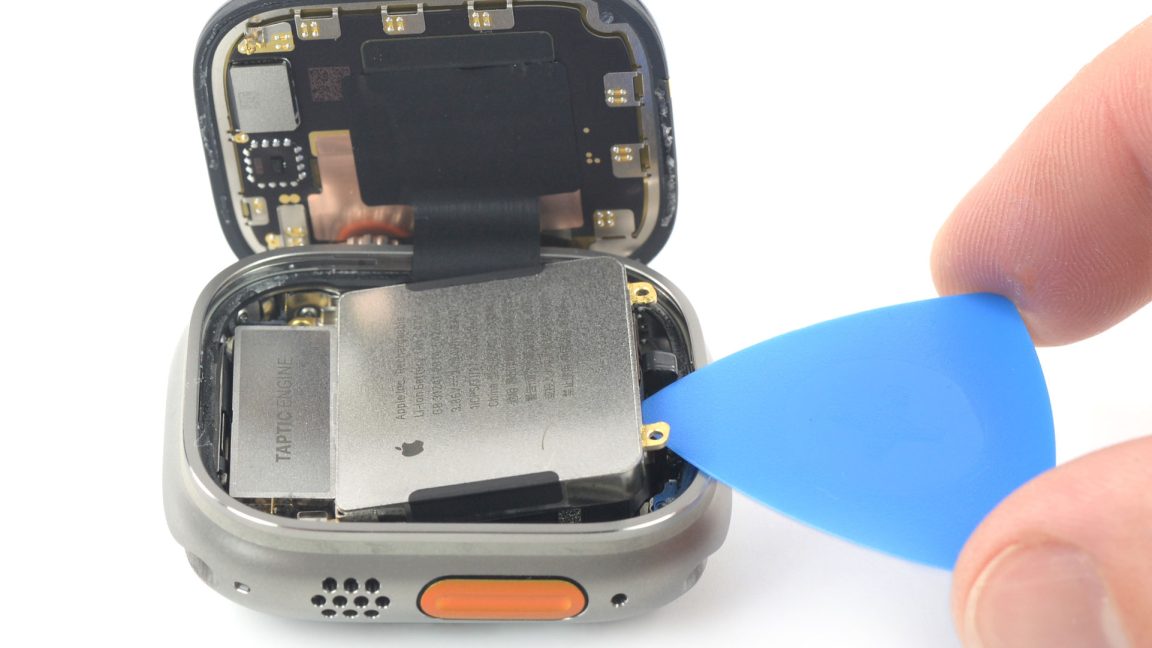
The Apple Watch Ultra 2 is widely regarded as the pinnacle of wearable technology. With its rugged titanium casing, flat sapphire crystal, and an advertised 36-hour battery life, it is built for the most extreme environments on Earth. However, there is one specific environment that challenges even the toughest hardware: the scorching summer of the UAE. If you have noticed your watch struggling to keep up during July and August, you aren’t imagining things. Understanding how the Dubai heat affects your Apple Watch Ultra battery life is essential for any resident who relies on their tech for outdoor fitness or daily navigation.
In this guide, we will dive deep into the science of thermal management, explore why your battery might be draining faster than usual, and provide actionable tips to keep your “Ultra” performing at its peak.
The Science of Heat and Lithium-Ion Batteries
To understand how the Dubai heat affects your Apple Watch Ultra battery life, we first need to look at what is happening inside that titanium shell. Like almost all modern electronics, the Apple Watch Ultra uses a Lithium-ion (Li-ion) battery. These batteries rely on chemical reactions to move ions between the anode and cathode.
1. Increased Internal Resistance
When the ambient temperature in Dubai climbs past 40°C, the internal temperature of your watch rises even higher. Heat causes the atoms inside the battery to vibrate more violently. This increases “internal resistance,” meaning the battery has to work significantly harder to push electricity to the S9 SiP chip. As a result, you see a much faster percentage drop even if you aren’t doing anything intensive.
2. Accelerated Chemical Aging
Every battery has a finite lifespan. However, high heat acts as a catalyst for “chemical aging.” If your watch frequently hits the “thermal ceiling,” the liquid electrolyte inside the battery can begin to degrade or crystallize. This permanently reduces the total amount of energy the battery can hold, leading to a drop in your Maximum Capacity percentage.
Common Signs the Dubai Heat is Impacting Your Watch
You don’t need a lab to see how the Dubai heat affects your Apple Watch Ultra battery life. Your device will often give you physical and software-based warnings that it is struggling with the environment.
The “Charging on Hold” Notification
Have you ever picked your watch up from its magnetic puck only to see a message saying “Charging on Hold”? This happens because the watch has detected that it is too hot to safely accept a charge. In Dubai, if you charge your watch in a room without active AC, or near a window, the watch will pause the process to prevent the battery from swelling.
Display Dimming for Apple Watch Ultra Battery
The 3,000-nit Retina display on the Apple Watch Ultra is incredibly bright, but it generates a lot of heat. If the watch detects that its internal temperature is reaching dangerous levels, it will automatically throttle the brightness. If your screen suddenly looks dim while you’re walking in Downtown Dubai, it is likely a thermal protection measure.
Sluggish Interface and Lag for Apple Watch Ultra Battery
Heat forces the processor to “throttle” its speed to reduce power consumption and heat output. If your apps are taking longer to open or the Double Tap gesture feels unresponsive, your watch is likely trying to cool itself down.
5 Practical Tips to Save Your Battery in the UAE
While we can’t change the weather, we can change how we interact with our tech. Here is how to mitigate the effects of the heat:
- Avoid Direct Sunlight: When sitting at an outdoor café or driving, try to keep your watch in the shade. Direct sunlight on the black titanium or the sapphire glass acts like a magnifying glass for heat.
- Charge in a Cool Environment: Always charge your watch in a well-ventilated, air-conditioned room. Avoid charging it in a car that has been sitting in the sun.
- Turn Off “Always-On” During Midday: The Always-On display keeps pixels firing and generating heat. Turning this off during the hottest hours of the day can significantly lower the internal temperature.
- Use Low Power Mode for Outdoor Workouts: If you are running on the Kite Beach track in the heat, enable Low Power Mode. This reduces the frequency of heart rate pings and GPS updates, lowering the thermal load on the battery.
- Check Your Battery Health Regularly: Go to Settings > Battery > Battery Health. If your capacity has dropped below 85%, the heat will affect it much more severely than a fresh battery.
Milaaj Mobile and Laptop Repair Dubai: Your Thermal Experts
If the heat has already taken a toll on your device, you need a repair partner that understands the high-tech requirements of the Ultra series. Milaaj mobile and laptop repair Dubai is the leading destination for Apple Watch enthusiasts who demand precision and reliability.
The Milaaj Advantage for Apple Watch Owners:
- Speed Repairing: We know you rely on your watch for health tracking and Apple Pay. We offer fast battery replacements and thermal diagnostics, often getting your watch back to you the same day.
- Low Price & Transparency: Apple Watch Ultra repairs can be expensive at authorized centers. We provide a low price for battery and sensor services without the “brand-name markup.”
- Ultimate Convenience: Located in Al Barsha, we serve the entire city. If you can’t leave your home or office, we offer free pickup and delivery. Our courier will collect your watch and return it once it’s fixed.
- Premium Part Quality: We only use original-spec or genuine-grade batteries. This ensures your Ultra still supports fast charging and maintains its 2,000 to 3,000 nit brightness levels.
- Professional Resealing: A major concern with repairing an Ultra is the WR100 water resistance. Our technicians use specialized gaskets and pressure-testing equipment to ensure your watch remains safe for swimming after the repair.
FAQs About Apple Watch Ultra Battery
1. Does the Apple Watch Ultra have better heat resistance than the Series 10?
Yes, the titanium casing of the Ultra dissipates heat slightly better than aluminum, and its larger size allows for more internal “breathing room.” However, the core battery chemistry remains the same, so both are vulnerable to the Dubai summer.
2. Is it safe to wear my Apple Watch Ultra in a sauna or steam room?
We strongly advise against it. Saunas exceed the recommended operating temperature (0° to 35° C) of the Apple Watch. Combined with the high humidity, this can lead to seal failure and permanent battery damage.
3. Why does my battery drain so fast when I use GPS in the summer?
GPS requires a constant high-power connection to satellites. When combined with the external heat of Dubai, the battery has to work twice as hard to maintain the connection and manage the internal temperature, leading to rapid drain.
4. Can a “sticky” Digital Crown be caused by heat?
Indirectly, yes. Heat can cause internal lubricants or seals to soften, which can then trap more dust and salt. If your crown feels unresponsive, it may need a professional cleaning.
5. What should I do if my watch shows a “Temperature” warning icon?
Remove the watch from your wrist immediately and place it in a cool, shaded area. Do not put it in the fridge or freezer, as the sudden temperature shift can cause condensation inside the glass.
Summary: Apple Watch Ultra Battery
The Apple Watch Ultra is a significant investment, and understanding how the Dubai heat affects your Apple Watch Ultra battery life is the best way to protect that investment. By following proper charging habits and being mindful of thermal stress, you can ensure your watch lasts for years rather than months.
If you find that your battery is no longer holding a charge or your watch is constantly overheating, don’t wait for the battery to swell and damage the screen. Seek professional help from experts who know exactly how to handle high-end titanium hardware.
Is your Apple Watch Ultra struggling with the heat? Contact Milaaj today for a professional battery health check and thermal diagnostic!
Get professional apple watch repair services with expert technicians ensuring top-quality results.
Back in your hands faster: Enjoy rapid, reliable doorstep delivery for every device we service or sell.
Sell your old iPhone with confidence and get the best value instantly.
📍 Visit Any Milaaj Branch in Dubai
🔹 Bur Dubai
Milaaj Mobile and Laptop Repair Dubai
📞 055 258 8477
🔗 Google Maps
🔹 Al Barsha
Milaaj Mobiles and Laptop Repair Al Barsha
📞 052 596 2846
🔗 Google Maps
🔹 Al Barsha 3
Milaaj Mobiles and Gaming Store
📞 052 3405 814
🔗 Google Maps
🔹 Al Nuaimiya
Milaaj Mobiles and Laptops Ajman
📞 055 788 9654
🔗 Google Maps
📧 Email: support@milaaj.com
🕒 Operating Hours: Monday – Sunday


Leave a Reply