
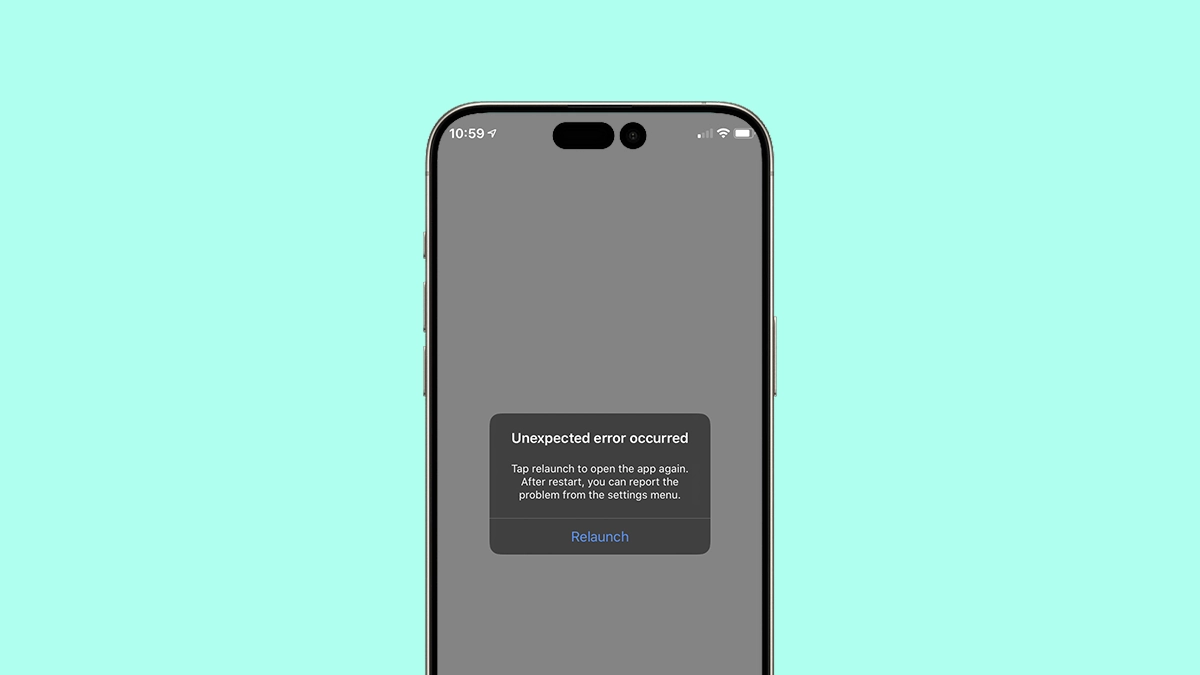
When you install the latest iOS version, you expect improved features, enhanced speed, and better performance. However, many users experience the opposite—apps crashing after iOS update, apps refusing to open, freezing screens, and unexpected shutdowns. This problem is extremely common, especially after major updates that change system frameworks, security rules, and app compatibility requirements. Even though updates aim to optimize your device, they can occasionally introduce conflicts that lead to unstable app performance.
Moreover, these app crashes can disrupt your workflow, affect your productivity, and interfere with essential daily tasks such as messaging, banking, reporting, or navigation. Fortunately, most issues related to apps crashing after iOS update can be fixed at home using simple troubleshooting techniques. And for deeper system-level or hardware-related failures, expert technicians can restore your device quickly and safely.
In this comprehensive guide, we will explain why apps crash after updates, explore the most effective solutions, and discuss when professional repair becomes necessary to regain smooth performance.
Why Apps Are Crashing After iOS Update
Understanding why you are experiencing apps crashing after iOS update is the first step toward fixing the issue. Although it may seem like a random glitch, several technical factors contribute to this problem.
App Crashes After Update Due to Software Conflicts
One of the most common reasons for apps crashing after iOS update is a conflict between the new system files and existing app data. When apps are not updated to support the latest iOS version, they begin to malfunction, fail to launch, or close immediately after opening.
App Crashing Caused by Outdated App Versions
Sometimes developers need extra time to update their apps after a new iOS version is released. As a result, the outdated version becomes unstable. Additionally, apps that haven’t been updated for months before the iOS update are more likely to crash.
Insufficient Storage Leading to App Crashes
Low storage can also trigger apps crashing after iOS update, since the system requires extra space to rebuild caches, process background tasks, and manage app data. When storage is extremely limited, apps begin freezing or forcibly closing.
iOS Framework Changes Breaking App Compatibility
Major updates often introduce new frameworks, security patches, or performance enhancements. Consequently, apps built on older frameworks may fail to run properly—especially banking apps, payment apps, or apps with strict security requirements.
Corrupted App Data After iOS Update
In some cases, app files or caches become corrupted during the update process. This is especially common when the update was interrupted, installed with low battery, or applied through unstable Wi-Fi.
Symptoms of Apps Crashing After iOS Update
If your iPhone is experiencing apps crashing after iOS update, watch for these symptoms:
- Apps open but immediately close
- Apps freeze for several seconds before responding
- Touch becomes unresponsive inside certain apps
- Apps reload automatically while multitasking
- Background refresh fails
- Apps crash during login or verification
- Apps crash only on Wi-Fi or only on mobile data
These symptoms confirm that your device is experiencing instability caused by the update.
How to Fix Apps Crashing After iOS Update
Fortunately, most issues related to apps crashing after iOS update can be fixed with simple steps. Below are the most effective solutions.
Restart Your Device to Resolve App Crashes After Update
Restarting clears temporary system conflicts.
Additionally, it refreshes system memory and can immediately stop apps from crashing.
Update All Apps to Fix App Crashing Problems
Open the App Store → Profile → Update All.
Moreover, updating ensures each app is compatible with the new iOS version.
Clear App Cache or Reinstall the App
Sometimes cached data becomes corrupted.
Try deleting the app, restarting your device, and reinstalling it.
Consequently, the app loads fresh data compatible with the updated system.
Reset All Settings to Fix Persistent App Crashes
If app crashes continue, resetting system settings often resolves hidden conflicts:
Settings → General → Reset → Reset All Settings
Importantly, this does not delete your data—it only resets preferences.
Check Storage and Remove Unnecessary Files
Low storage can cause apps to crash repeatedly.
Free up space by deleting unused files, apps, or old media.
Therefore, your device will run more smoothly.
Update to the Latest iOS Patch
Apple often releases small updates (like iOS 17.1.2) to fix app crash bugs.
Install these patches to stabilize your apps.
Perform a System Restore for Severe App Crashes
If nothing else works, restoring your iPhone through iTunes or Finder can fix deep system conflicts.
However, this should be done only after backing up your data.
Advanced Fixes for Severe App Crash Problems
If your apps are still crashing after trying all the above steps, the issue may be deeper.
Fix App Crashes After Update Due to Firmware Corruption
In rare cases, the update corrupts firmware files, leading to persistent crashes.
This requires advanced repair tools that regular users don’t have access to.
Internal Hardware Issues Causing App Crashes
Unexpected app crashes can also be linked to hardware faults such as:
- Faulty NAND storage
- Damaged CPU
- Motherboard issues
- Overheating ICs
These require expert testing to diagnose accurately.
Professional Repair for Apps Crashing After iOS Update (Milaaj Service Section)
If you still face apps crashing after iOS update, it may be time to seek professional help.
This is where Milaaj becomes essential.
Why Choose Milaaj for App Crash Repair?
✅ Low-cost and transparent repair pricing
Milaaj offers affordable service rates without hidden charges.
✅ Fast repair service
Most app-crash or software repairs are completed the same day.
✅ High-quality parts (where required)
Only premium-grade components are used for hardware-related repairs.
✅ Expert technicians with advanced tools
They use specialized diagnostic software, reprogramming tools, and micro-repair stations.
✅ Convenient service options
Walk-in, pick-up & drop-off, and on-site repair options are available for maximum convenience.
✅ Reliable data protection
Your data remains safe and secure during all repair processes.
How Technicians Fix Apps Crashing After Update
Professional technicians follow a deeper and more technical approach:
- Software re-flashing
- Firmware restoration
- NAND health scanning
- Board-level diagnosis
- Corrupted file repair
- Deep cache reconstruction
- Full system optimization
Therefore, they can fix even the most severe app crash problems that regular troubleshooting cannot solve.
FAQs: Apps crashing after iOS update
1. Why are my apps crashing after the latest iOS update?
This usually happens due to app incompatibility, corrupted cache, software conflicts, or outdated app versions.
2. How do I stop apps from crashing on my iPhone?
Try updating your apps, restarting your device, clearing cache, or resetting settings.
3. Do I need to reinstall the app?
Yes—reinstalling can fix corrupted app data, which often solves crash issues.
4. Will factory reset fix app crashes?
It can, but only as a last resort. Always back up your data first.
5. When should I visit a repair center?
If apps still crash after troubleshooting, it may be a deeper software or hardware issue requiring expert diagnostics.
Conclusion: Apps crashing after iOS update
Experiencing apps crashing after iOS update can be frustrating, but it’s usually easy to fix with the right steps. Whether the issue is caused by outdated apps, software conflicts, corrupted data, or insufficient storage, most problems can be resolved with simple troubleshooting.
However, if your apps continue to crash, freeze, or close unexpectedly, professional repair becomes necessary. With expert help from Milaaj Mobile and Laptop Repair Dubai, you can restore your iPhone’s performance quickly, safely, and affordably.
Get professional iPhone repair services with expert technicians ensuring top-quality results.
Enjoy quick and reliable home delivery for your repaired or purchased devices.
Sell your old iPhone with confidence and get the best value instantly.
📍 Visit Any Milaaj Branch in Dubai
🔹 Bur Dubai
Milaaj Mobile and Laptop Repair Dubai
📞 055 258 8477
🔗 Google Maps
🔹 Al Barsha
Milaaj Mobiles and Laptop Repair Al Barsha
📞 052 596 2846
🔗 Google Maps
🔹 Al Barsha 3
Milaaj Service Center Reef Mall
📞 052 3405 814
🔗 Google Maps
🔹 Al Nuaimiya
Milaaj Mobiles and Laptops Ajman
📞 055 788 9654
🔗 Google Maps
📧 Email: support@milaaj.com
🕒 Operating Hours: Monday – Sunday



Leave a Reply