
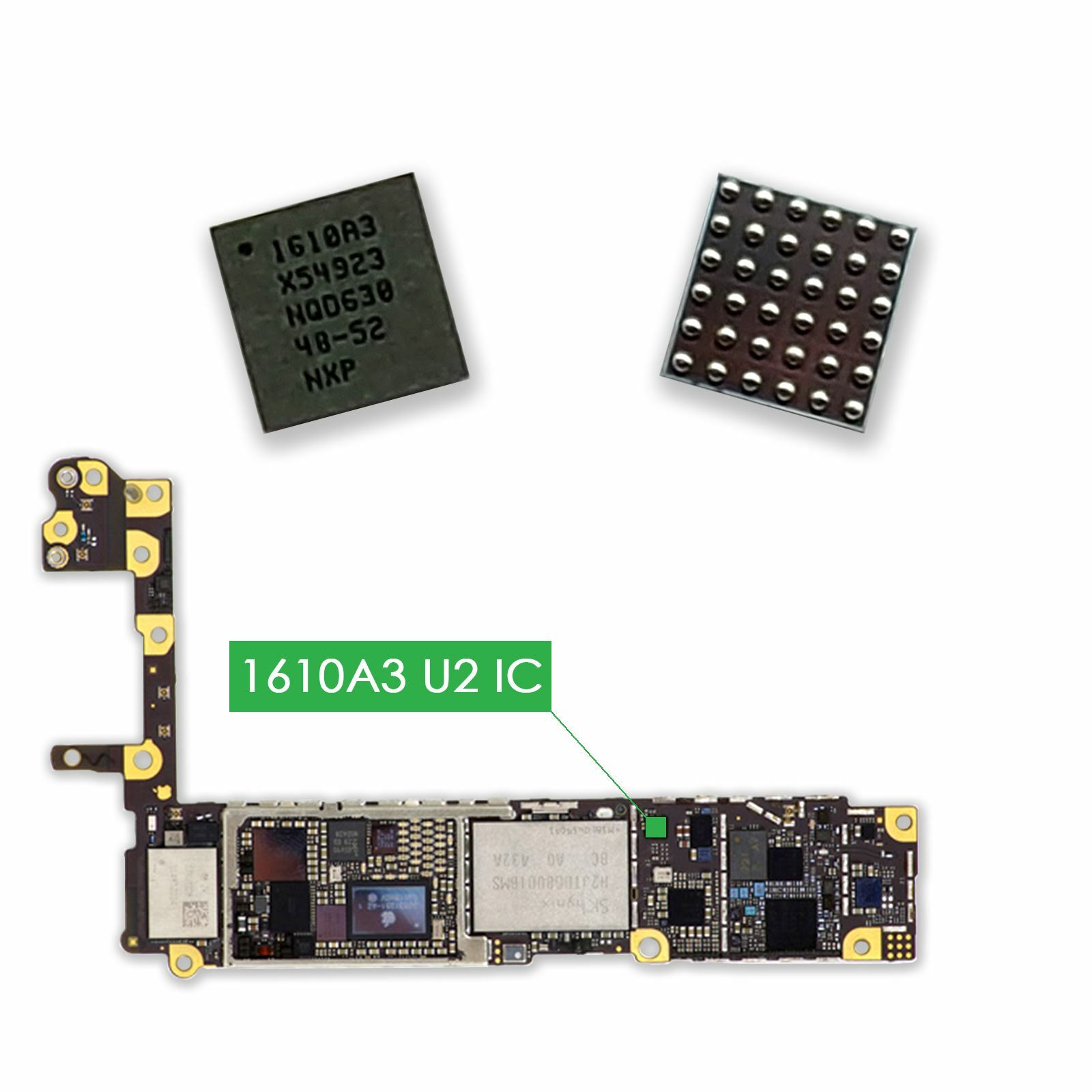
Before diving into solutions, it’s essential to understand what the iPhone Charging IC / Tristar Fault actually is. The Tristar IC (often labeled as “U2” chip on the logic board) is responsible for regulating power input, detecting USB accessories, and communicating between the battery, logic board, and charger.
When this IC becomes faulty, your iPhone may stop charging, overheat, or fail to recognize cables and accessories. Moreover, because this chip manages critical power functions, even a small malfunction can prevent your iPhone from turning on or charging properly.
Common Symptoms of an iPhone Charging IC / Tristar Fault
Recognizing the signs early can help prevent more serious damage. Some of the most common symptoms include:
- iPhone not charging at all even with a working cable and adapter.
- “Accessory not supported” alert when you plug in your charger.
- Rapid battery drain or overheating during charging.
- Charging only when powered off but not while the phone is on.
- iTunes or Finder not recognizing your iPhone when connected to a computer.
Additionally, your device may power on briefly before shutting off again, a key indicator of an iPhone Charging IC / Tristar Fault.
Why Does an iPhone Charging IC / Tristar Fault Occur?
Several underlying causes can trigger this fault, but the most frequent ones include:
1. Using Non-Original Chargers or Cables
Although cheaper alternatives might seem convenient, non-certified accessories can deliver unstable power, causing voltage spikes that damage the Tristar IC.
2. Power Surges and Electrical Fluctuations
Sudden current surges can overload the charging circuit, burning or weakening the IC components.
3. Liquid or Moisture Exposure
Even minor exposure to moisture can cause corrosion on the logic board, leading to partial or complete failure of the Tristar IC.
4. Long-Term Wear and Tear
Over time, consistent charging cycles generate heat, and this can gradually degrade the IC’s performance, eventually leading to an iPhone Charging IC / Tristar Fault.
5. Improper Repair or Board-Level Damage
If your iPhone has undergone third-party repair without ESD protection, static discharge may have compromised sensitive chips like the Tristar IC.
How to Identify the iPhone Charging IC / Tristar Fault
Before rushing for a repair, you can perform a few tests to identify whether the iPhone Charging IC / Tristar Fault is indeed the problem.
1. Test with Different Chargers and Cables
Start by testing your iPhone with different Apple-certified cables and adapters. If the issue persists, the problem likely lies within the device.
2. Check Charging Behavior
Observe your iPhone’s charging pattern. Does it heat up, charge slowly, or stop charging randomly? These behaviors strongly suggest a faulty IC.
3. Inspect for Liquid Damage
Check the SIM tray area and charging port for corrosion or moisture. Liquid exposure can directly impact the Tristar IC.
4. Use Computer Connectivity Tests
If your iPhone doesn’t connect to iTunes or Finder despite using a working cable, this could confirm a charging communication failure caused by the Tristar IC.
5. Seek Professional Diagnostics
Ultimately, only a board-level technician can confirm an iPhone Charging IC / Tristar Fault through microscopic inspection and voltage testing.
Can You Fix an iPhone Charging IC / Tristar Fault at Home?
Realistically, repairing this issue at home isn’t recommended. Since the Tristar IC is a tiny surface-mounted component on the logic board, it requires micro-soldering tools and advanced expertise.
However, you can try the following non-invasive steps before visiting a repair shop:
- Clean the charging port with a soft brush and isopropyl alcohol.
- Restart or force restart your iPhone to reset system-level errors.
- Update iOS to ensure software isn’t interfering with charging.
- Reset all settings (without erasing data) to clear charging configuration conflicts.
If none of these steps help, it’s safe to assume your phone needs professional Tristar IC replacement.
Professional Repair for iPhone Charging IC / Tristar Fault
When facing this type of hardware issue, professional intervention is your best option. At Milaaj, certified technicians specialize in iPhone Charging IC / Tristar Fault repairs. They use advanced diagnostics, original components, and precision soldering tools to restore your device’s power system.
Moreover, Milaaj’s team ensures every device undergoes a full functionality test after repair — so you can trust your iPhone to perform like new again.
How Technicians Repair a Faulty iPhone Charging IC
To better understand the process, here’s what typically happens during a professional repair:
- Diagnosis: The technician tests voltage levels across the charging line to confirm Tristar failure.
- Disassembly: The iPhone’s logic board is carefully removed.
- Chip Removal: Using micro-soldering, the faulty Tristar IC is detached.
- Board Cleaning: The board pads are cleaned and prepped for a new IC.
- New IC Installation: A replacement Tristar IC is soldered into place.
- Testing and Reassembly: The device is reassembled and tested for full functionality.
Although this repair may sound complex, it typically restores your iPhone’s charging capability completely when done correctly.
Preventing Future iPhone Charging IC / Tristar Faults
Prevention is always better than repair. To avoid future Tristar issues, follow these tips:
- Always use original Apple chargers and cables.
- Avoid charging your iPhone overnight or in high-temperature environments.
- Keep your device away from liquids or humid conditions.
- Use surge protectors when charging during electrical fluctuations.
- Handle your phone carefully to avoid internal damage.
By maintaining proper charging habits, you can significantly extend your iPhone’s lifespan and minimize the risk of iPhone Charging IC / Tristar Faults.
When to Replace Instead of Repair
In some rare cases, replacing the entire logic board might be more cost-effective — especially if multiple power ICs are damaged. Discuss this with your technician to understand whether a replacement or repair best suits your budget and device condition.
Dealing with an iPhone Charging IC / Tristar Fault can be overwhelming, especially when your phone suddenly stops charging or connecting. However, understanding the symptoms, causes, and professional repair options can make the process far smoother.
If you’re in Dubai and suspect your iPhone has a charging IC fault, don’t risk further damage by experimenting at home. Instead, visit Milaaj Mobile and Laptop Repair Dubai, where expert technicians can quickly diagnose and fix the issue using genuine components and advanced micro-soldering tools.
With the right care and attention, your iPhone can be restored to full power functionality — saving you both time and money in the long run.
Get professional iPhone repair services with expert technicians ensuring top-quality results.
Enjoy quick and reliable home delivery for your repaired or purchased devices.
Sell your old iPhone with confidence and get the best value instantly.
📍 Visit Any Milaaj Branch in Dubai
🔹 Bur Dubai
Milaaj Mobile and Laptop Repair Dubai
📞 055 258 8477
🔗 Google Maps
🔹 Al Barsha
Milaaj Mobiles and Laptop Repair Al Barsha
📞 052 596 2846
🔗 Google Maps
🔹 Reef Mall (Salah Al Din)
Milaaj Service Center Reef Mall
📞 052 3405 814
📍 1st Floor, Shop 16, Deira
🔗 Google Maps
🔹 Al Nuaimiya
Milaaj Mobiles and Laptops Ajman
📞 055 788 9654
🔗 Google Maps
📧 Email: support@milaaj.com
🕒 Operating Hours: Monday – Sunday

Leave a Reply