
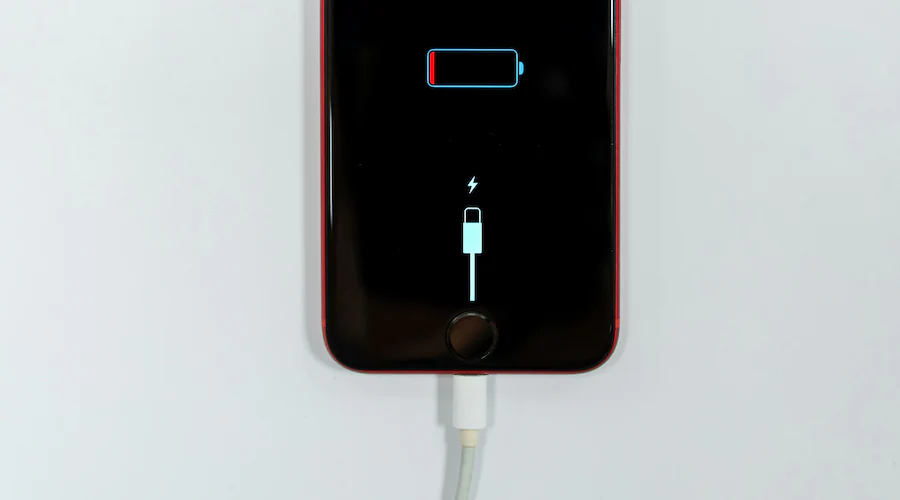
Apple iPhones are known for their reliability, premium build quality, and seamless performance. However, many users eventually face a frustrating issue: iPhone not recognizing charger. When this happens, charging interruptions can slow productivity, drain battery life, and even prevent important updates. Therefore, understanding why your iPhone fails to detect a charger is crucial for quick and safe resolution.
Fortunately, iPhone not recognizing charger problems are often fixable without replacing the device. With the right troubleshooting steps, expert solutions, and professional repair support, you can restore proper charging performance efficiently. Now, let’s explore the real causes and proven solutions that actually work.
Why iPhone Not Recognizing Charger Happens
First and foremost, identifying the root cause is essential. In most cases, iPhone not recognizing charger issues result from hardware wear, software glitches, or power compatibility problems.
Common Reasons iPhone Not Recognizing Charger
- Damaged or non-certified charging cable
- Dirty or blocked charging port
- Software bugs after iOS updates
- Battery health or charging IC issues
- Power source instability
As a result, even genuine chargers may stop working properly if underlying issues remain unresolved.
Signs Your iPhone Is Not Recognizing the Charger
Before jumping to solutions, it’s important to recognize the symptoms early. Typically, users experiencing iPhone not recognizing charger problems notice:
- No charging icon appearing
- Frequent “Accessory Not Supported” warnings
- Charging starts and stops repeatedly
- iPhone only charges when cable is angled
- Slow or inconsistent charging
Consequently, ignoring these signs may lead to complete charging failure over time.
Damaged or Incompatible Charger and Cable Issues
Non-Certified Accessories Cause Charging Problems
To begin with, Apple devices rely heavily on certified accessories. Using low-quality or uncertified cables often triggers iPhone not recognizing charger errors. Moreover, internal cable damage may not be visible externally.
How to Fix Charger Compatibility Issues
- Always use MFi-certified cables
- Test with another original adapter
- Avoid cheap third-party chargers
- Replace frayed or loose cables
As a result, switching to a certified charger often resolves the issue instantly.
Dirty or Blocked Charging Port
Why Debris Affects Charging Recognition
Over time, dust, lint, and debris collect inside the charging port. Consequently, this prevents the charger from making a proper connection, leading to iPhone not recognizing charger errors.
Safe Ways to Clean the Charging Port
- Use a soft brush or wooden toothpick
- Avoid metal tools or liquids
- Turn off the device before cleaning
However, if debris is compacted deep inside, professional cleaning is recommended to prevent port damage.
Software Bugs and iOS Update Issues
How iOS Updates Affect Charging
Sometimes, iPhone not recognizing charger problems begin after a system update. This happens because temporary bugs interfere with power management settings.
Software Fixes That Help for iPhone not recognizing charger
- Restart the iPhone
- Update to the latest iOS version
- Reset all settings (without deleting data)
Therefore, keeping your iPhone software updated helps eliminate compatibility issues.
Battery Health and Power Management Limitations
Reduced Battery Health Impacts Charging
When battery health drops significantly, iOS may limit charging speeds or refuse to charge intermittently. As a result, the phone may display iPhone not identifying charger warnings even with working accessories.
How to Check Battery Health for iPhone not recognizing charger
- Go to Settings → Battery → Battery Health
- Check maximum capacity percentage
If battery health is low, replacement becomes the most reliable solution.
Charging IC and Internal Hardware Issues
What Is a Charging IC Problem? for iPhone not recognizing charger
The charging IC controls how power flows into your iPhone. Damage caused by moisture, power surges, or overheating often results in iPhone not identifying charger problems.
Signs of Internal Charging Damage
- Phone heats up while charging
- Charger works intermittently
- Battery drains unusually fast
In such cases, professional micro-soldering repair is required.
Quick Troubleshooting Checklist
Before seeking professional help, try these steps:
- Test a different certified charger
- Clean charging port carefully
- Restart the iPhone
- Update iOS software
- Check battery health
If the issue persists, expert repair is the safest option.
Professional Repair Solutions That Work
When basic troubleshooting fails, professional repair becomes essential. Advanced tools and trained technicians can safely diagnose iPhone not identifying charger problems without risking data loss.
Professional Repairs Include for iPhone not recognizing charger
- Charging port replacement
- Battery replacement
- Charging IC repair
- Internal connector restoration
As a result, professional repairs offer long-term reliability rather than temporary fixes.
Why Choose Milaaj Mobile and Laptop Repair Dubai
When facing persistent iPhone not recognizing charger issues, choosing the right repair service matters. Milaaj mobile and laptop repair Dubai provides expert Apple device repair with customer-focused service.
Benefits of Choosing Milaaj
- Low-cost repair options
- Fast turnaround time
- High-quality replacement parts
- Data-safe repair process
- Convenient service location
Moreover, experienced technicians ensure your iPhone charges properly again without unnecessary replacements.
Prevent iPhone Charger Recognition Issues in the Future
Smart Charging Habits for iPhone not recognizing charger
- Avoid charging in dusty environments
- Use certified accessories only
- Do not bend or twist cables
- Keep charging port clean
Long-Term Maintenance Tips
- Monitor battery health regularly
- Avoid extreme temperatures
- Update iOS promptly
Therefore, preventive care reduces the risk of repeated iPhone not identifying charger problems.
FAQs About iPhone not recognizing charger
Why does my iPhone say accessory not supported?
This usually happens due to non-certified cables, dirty ports, or internal charging issues.
Can a software update cause charger recognition problems?
Yes, temporary iOS bugs may interfere with charging detection after updates.
Is it safe to clean the charging port at home?
Yes, but only with non-metal tools. Otherwise, professional cleaning is safer.
Does battery replacement fix charger recognition issues?
Yes, if low battery health is the cause, replacement restores proper charging.
How long does professional charging repair take?
Most repairs are completed within a few hours.
Conclusion: iPhone not recognizing charger
In conclusion, iPhone not recognizing charger problems can be frustrating, but they are rarely permanent. With proper troubleshooting, certified accessories, and expert repair support, your iPhone can regain reliable charging performance.
Rather than risking further damage with unsafe fixes, choosing professional repair ensures safety, speed, and lasting results. With the right care and timely action, your iPhone will continue to perform smoothly without charging interruptions.
Get professional iPhone repair services with expert technicians ensuring top-quality results.
Enjoy quick and reliable home delivery for your repaired or purchased devices.
Sell your old iPhone with confidence and get the best value instantly.
📍 Visit Any Milaaj Branch in Dubai
🔹 Bur Dubai
Milaaj Mobile and Laptop Repair Dubai
📞 055 258 8477
🔗 Google Maps
🔹 Al Barsha
Milaaj Mobiles and Laptop Repair Al Barsha
📞 052 596 2846
🔗 Google Maps
🔹 Al Barsha 3
Milaaj Service Center Reef Mall
📞 052 3405 814
🔗 Google Maps
🔹 Al Nuaimiya
Milaaj Mobiles and Laptops Ajman
📞 055 788 9654
🔗 Google Maps
📧 Email: support@milaaj.com
🕒 Operating Hours: Monday – Sunday


Leave a Reply