
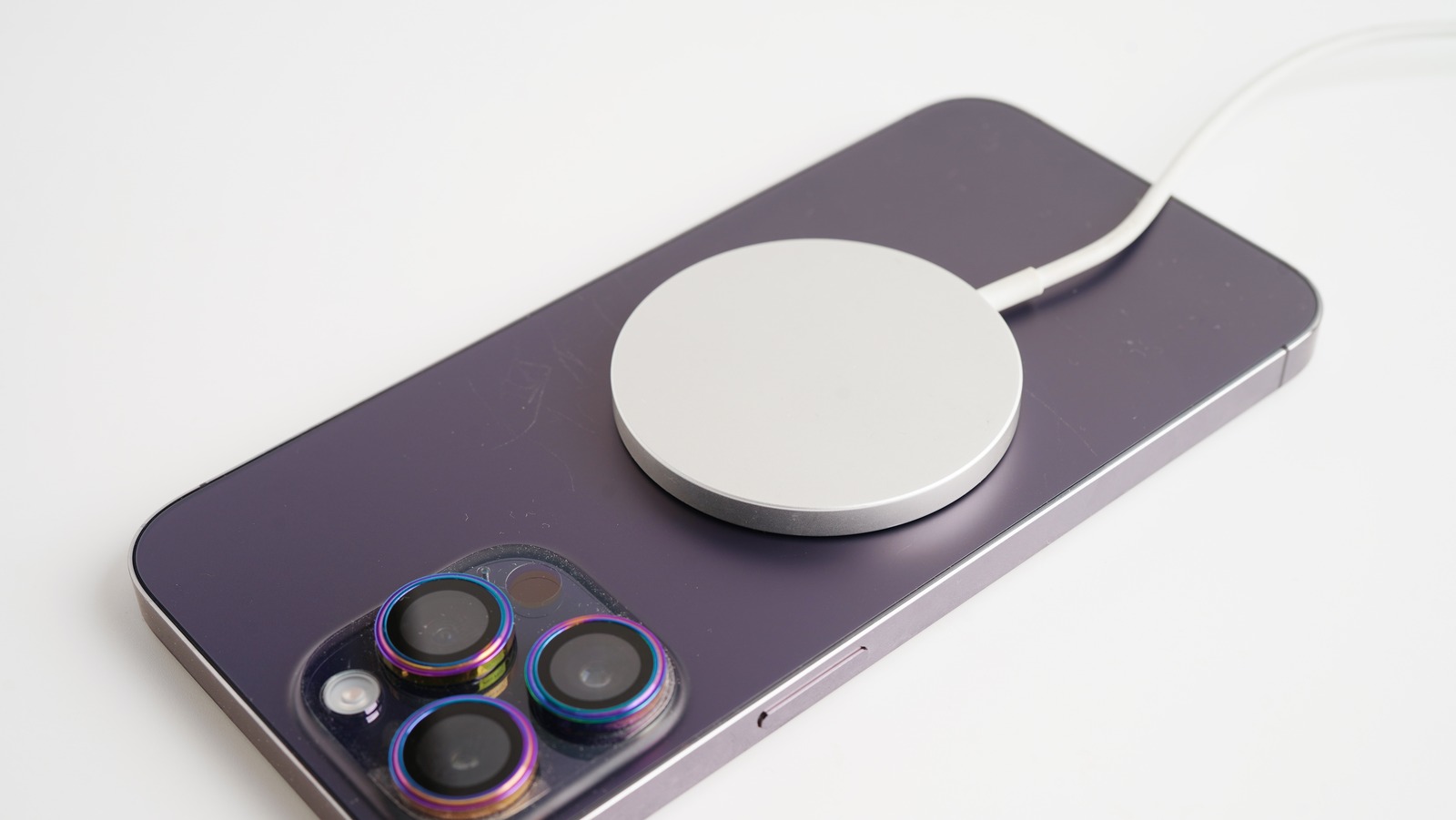
Is your iPhone wireless charging not working no matter how many times you adjust it on the charging pad? You’re not alone. Many iPhone users experience issues where wireless charging suddenly stops or becomes inconsistent. Whether it’s caused by a faulty charger, a software glitch, or a damaged charging coil, the problem can be frustrating — especially when you rely on wireless charging daily.
In this comprehensive guide, we’ll walk you through why your iPhone wireless charging not working, how to diagnose the issue correctly, and the step-by-step methods to fix it at home. Additionally, we’ll highlight when to seek expert help from Milaaj Mobile and Laptop Repair Dubai, your trusted repair destination for Apple devices.
Common Reasons Why iPhone Wireless Charging Not Working
Before jumping into solutions, it’s important to understand what could be causing your iPhone wireless charging not working issue. Several factors may interfere with wireless charging efficiency, including hardware, software, and environmental conditions.
1. Misalignment on the Charging Pad
The most common cause is improper alignment. Wireless charging works through electromagnetic induction, and if your iPhone isn’t positioned correctly, the energy transfer won’t occur effectively.
2. Case or Metal Obstruction
Phone cases, especially thick or metallic ones, can block the magnetic field between your iPhone and the charger. This often leads to slow charging or complete failure.
3. Dirty Charging Surface
Dust or debris on the back of your phone or the charging pad can interrupt the connection. A quick cleaning might be all that’s needed.
4. Software Bugs for iPhone wireless charging not working
Sometimes, iOS glitches or pending updates interfere with wireless charging. Restarting or updating your phone can resolve these issues efficiently.
5. Defective Charging Pad or Cable
If your charger is faulty, your iPhone wireless charging not working problem could stem from the pad itself or the adapter cable powering it.
6. Overheating or Power Management
When your iPhone becomes too hot, it automatically limits charging to prevent damage. This safety feature may temporarily stop wireless charging until your device cools down.
Basic Checks Before Troubleshooting
Before proceeding with complex fixes, start with a few simple checks that can often solve the iPhone wireless charging not working problem instantly.
1. Ensure Wireless Charging Compatibility
Not every iPhone model supports wireless charging. iPhones from the iPhone 8 series onward support Qi-based wireless charging. Make sure your model is compatible.
2. Remove Thick or Metal Cases
Remove any protective cases, wallets, or accessories that could block the magnetic connection. Even magnetic mounts or ring holders can disrupt charging performance.
3. Clean the Charging Pad and iPhone Back
Use a soft microfiber cloth to wipe both surfaces. A small dust layer can reduce charging efficiency dramatically.
4. Check Power Source
Ensure the power adapter and cable used with the pad are functioning correctly. Try connecting the pad to a different wall adapter or power outlet.
5. Restart Your iPhone
Restarting clears temporary software glitches that may be stopping wireless charging from working.
Software Fixes for iPhone Wireless Charging Not Working
If the hardware appears fine, software might be the culprit. Let’s go through the key steps to resolve software-related issues.
1. Update iOS for iPhone wireless charging not working
Apple frequently releases software updates to fix charging bugs.
To check for updates:
- Go to Settings > General > Software Update.
- If an update is available, tap Download and Install.
2. Reset All Settings for iPhone wireless charging not working
If your iPhone wireless charging not working persists, there might be a settings conflict.
Navigate to Settings > General > Transfer or Reset iPhone > Reset > Reset All Settings.
This will reset preferences without erasing your data.
3. Enable Optimized Battery Charging
Sometimes, battery management settings can influence charging behavior. Keeping Optimized Battery Charging enabled ensures your phone charges efficiently without overheating.
4. Turn Off Low Power Mode for iPhone wireless charging not working
Low Power Mode conserves battery by reducing background activity but may affect wireless charging speed or connection. Turn it off from Settings > Battery.
5. Check for Third-Party App Conflicts
Some apps that control power or performance might interfere with charging. Boot your iPhone into Safe Mode (by using recovery options) to check if it charges without third-party interference.
Hardware Diagnosis: When iPhone Wireless Charging Not Working
When software fixes fail, it’s time to consider possible hardware faults. Below are some hardware-related causes and solutions.
1. Test with Another Charging Pad
Try using a different certified Qi charger. If the new one works, your old charging pad might be defective.
2. Inspect the iPhone Back Panel
A cracked or damaged back glass can prevent charging coil contact. Additionally, any internal misalignment can cause failure in inductive charging.
3. Check for Water or Moisture Damage
Moisture trapped inside your device can affect charging coils or connectors. Keep your iPhone dry and avoid charging until it’s completely moisture-free.
4. Inspect the Power Adapter
Sometimes, the adapter or USB cable used with your wireless pad can limit power delivery. Always use original or certified Apple accessories for best results.
5. Internal Charging Coil Damage
If your iPhone wireless charging not working even with different pads and power sources, the internal charging coil may be faulty. This requires professional repair or replacement.
Advanced Hardware Testing by Milaaj Mobile and Laptop Repair Dubai
At this point, if your iPhone wireless charging not working persists, professional inspection is the best next step.
At Milaaj, expert technicians use advanced diagnostic tools to pinpoint the exact cause. They examine both hardware and software aspects, including:
- Wireless Coil Circuit Testing
- Battery Connector and IC Analysis
- Power Supply Calibration
- Motherboard Component Diagnostics
They offer genuine replacement parts and perform precise repairs using industry-standard equipment. Whether it’s a charging coil replacement, power IC repair, or logic board restoration, Milaaj Mobile and Laptop Repair Dubai ensures your iPhone regains optimal charging functionality quickly and safely.
Preventive Tips to Avoid iPhone wireless charging not working Issues
To ensure your iPhone wireless charging not working issue doesn’t reappear, follow these practical preventive measures:
- Use Apple-Certified Accessories: Non-certified chargers can cause overheating or charging interruptions.
- Avoid Extreme Temperatures: Both excessive heat and cold can reduce charging efficiency.
- Keep Charging Surfaces Clean: Regularly clean your phone and pad to prevent debris buildup.
- Don’t Stack Devices: Avoid placing keys, cards, or metal objects on the charging pad while charging.
- Restart Periodically: Restarting your phone weekly can clear minor background bugs.
When to Seek Professional Help
If none of these solutions work, your iPhone wireless charging not working issue may be caused by an internal hardware fault. This could include damaged charging coils, misaligned back panels, or faulty IC components.
In such cases, professional technicians at Milaaj can assess, repair, and restore your device to full functionality. They also offer same-day service and warranty coverage on all repairs, ensuring peace of mind.
Why Choose Milaaj Mobile and Laptop Repair Dubai
Choosing the right service center makes a significant difference when dealing with complex iPhone issues. Milaaj Mobile and Laptop Repair Dubai stands out because:
- Certified Apple Technicians: Skilled professionals trained for precision repairs.
- Advanced Diagnostic Tools: Latest equipment for fast and accurate testing.
- Genuine Spare Parts: Only original components used for durability and performance.
- Quick Turnaround: Most repairs completed within the same day.
- Affordable Pricing: Transparent pricing with no hidden fees.
So, whether it’s your iPhone wireless charging not working, battery draining quickly, or display malfunction, you can rely on their expertise to restore your device.
FAQs About iPhone wireless charging not working
1. Why is my iPhone not charging on a wireless charger?
Your iPhone might not be aligned properly on the charging pad or could have software glitches affecting charging.
2. Does iOS version affect wireless charging?
Yes. Outdated iOS versions may contain bugs that interfere with charging performance. Always keep your device updated.
3. Can a damaged back glass affect wireless charging?
Absolutely. The back glass houses the charging coil; any crack or misalignment can break the charging connection.
4. How do I know if my charger or iPhone is faulty?
Test your iPhone with another Qi charger or test the pad with another compatible phone. This helps isolate the issue.
5. Should I use third-party wireless chargers?
Always choose Apple-certified Qi chargers to prevent overheating or hardware damage.
iPhone wireless charging not working
When your iPhone wireless charging not working, it’s easy to feel frustrated — but most of the time, the issue is fixable with proper diagnosis. Start with simple solutions like cleaning your charging pad, updating iOS, and checking alignment. However, if the problem persists, professional inspection is essential.
At Milaaj Mobile and Laptop Repair Dubai, expert technicians can quickly identify whether your iPhone’s issue is related to hardware, software, or power management, and fix it efficiently. With the right care and preventive steps, your iPhone will continue to charge wirelessly — just like new.
Get professional iPhone repair services with expert technicians ensuring top-quality results.
Instead of trying random recovery apps, always rely on certified software or trusted repair centers like Milaaj for secure data restoration.
Enjoy quick and reliable home delivery for your repaired or purchased devices.
Sell your old iPhone with confidence and get the best value instantly.
📍 Visit Any Milaaj Branch in Dubai
🔹 Bur Dubai
Milaaj Mobile and Laptop Repair Dubai
📞 055 258 8477
🔗 Google Maps
🔹 Al Barsha
Milaaj Mobiles and Laptop Repair Al Barsha
📞 052 596 2846
🔗 Google Maps
🔹 Al Barsha 3
Milaaj Mobiles and Gaming Store
📞 052 3405 814
🔗 Google Maps
🔹 Al Nuaimiya
Milaaj Mobiles and Laptops Ajman
📞 055 788 9654
🔗 Google Maps
📧 Email: support@milaaj.com
🕒 Operating Hours: Monday – Sunday



Leave a Reply