
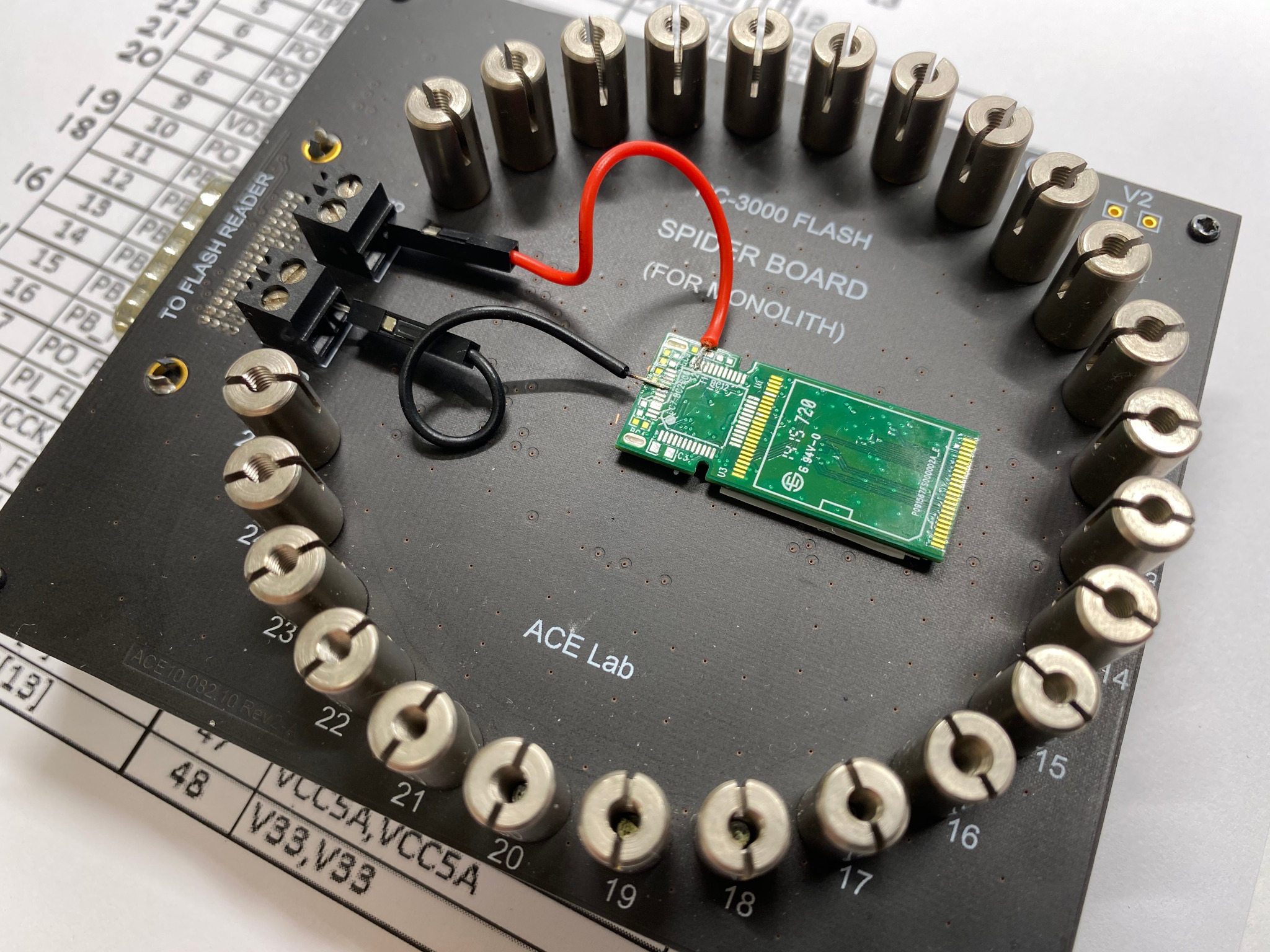
When your device suddenly stops booting, becomes stuck in a loop, or fails to read its internal storage, NAND chip repair & data extraction quickly becomes the only reliable solution. Although many users assume their data is permanently lost, most issues are caused by corrupted NAND storage, failed solder joints, overheating, or software-level damage that prevents the system from loading. As a result, photos, contacts, files, and app data become inaccessible even though they still exist on the NAND chip. Fortunately, with the right repair techniques and advanced recovery tools, experts can safely restore functionality and rescue critical data.
Moreover, as modern smartphones rely heavily on tightly integrated storage chips, any form of NAND corruption can lead to serious performance issues—including random shutdowns, slow booting, or complete device failure. Therefore, understanding how NAND chip repair & data extraction works is essential for anyone facing sudden data loss. In this comprehensive guide, we will explain the causes, symptoms, professional recovery methods, and preventive steps, while also highlighting how Milaaj Mobile and Laptop Repair Dubai provides fast, safe, and affordable NAND-based data recovery for all iPhone and iPad models.
What Is a NAND Chip?
To understand NAND chip repair & data extraction, you must first know what a NAND chip actually does.
The NAND chip is your device’s internal storage—a tiny but powerful microchip that holds:
- iOS/Android system files
- Photos, videos & documents
- App data & settings
- Boot files & firmware
- User accounts & encryption keys
In other words, if the NAND chip fails, the device loses access to nearly everything.
Why Do NAND Chips Fail? (Common Causes)
Because NAND chips store every piece of data, they can fail due to various reasons. Moreover, some issues develop slowly, while others occur instantly.
1. Physical Damage
- Accidental drops
- Hard impacts
- Bent motherboard
These shocks crack solder joints or damage internal chip layers.
2. Overheating for NAND Chip Repair & Data Extraction
Excessive heat from gaming, charging, or background apps weakens the chip’s lifespan.
3. Water or Humidity Damage
Even small moisture exposure can corrode NAND connections.
4. Bad Software Updates
Failed or incomplete updates corrupt system files inside the NAND chip.
5. Low-Quality Past Repairs
Non-genuine chip replacements or poor soldering cause long-term instability.
6. Natural Wear & Tear
Every NAND chip has a limited read/write lifespan.
Consequently, failure becomes inevitable once memory blocks degrade beyond repair.
Symptoms You Need NAND Chip Repair & Data Extraction
Before your device completely fails, it often shows early warning signs.
1. Boot Loop (Apple/Android Logo Stuck)
The device tries to load system memory but fails.
2. Random Shutdowns or Restarting
NAND corruption causes system crashes.
3. “Storage Full” Errors Even When Space Is Available
This indicates failing memory sectors.
4. Extremely Slow Performance
The device struggles to read/write data.
5. iTunes or Finder Fails to Restore
Error codes like 4013, 4014, 9, 40, or 14 often point to NAND issues.
6. Device Not Turning On for NAND Chip Repair & Data Extraction
Severe NAND failure can prevent power-up.
Therefore, when you see these symptoms, immediate diagnosis is essential to prevent permanent data loss.
How Experts Perform NAND Chip Repair for NAND chip repair & data extraction
Professional technicians use advanced micro-soldering methods to restore NAND functionality. Moreover, this delicate process requires specialized equipment and expert-level skill.
Step 1: Device Diagnosis
Technicians evaluate whether the issue is:
- Logic board damage
- NAND hardware failure
- Corrupt data blocks
- Boot loop from system corruption
They use microscopes, thermal cameras, and voltage tools for accurate diagnosis.
Step 2: Motherboard Disassembly
The motherboard is carefully removed without damaging:
- IC chips
- Connectors
- Flex cables
Additionally, protective shielding is lifted to access the NAND area.
Step 3: NAND Chip Removal (Micro-Soldering)
Technicians use:
- Rework stations
- Precision heat tools
- Micro-tip tweezers
The NAND chip is safely lifted from the board without harming surrounding components.
Step 4: Data Extraction Using Specialized Tools
Once removed, the NAND chip is inserted into a programmer.
Professionals can then extract:
- Photos
- Videos
- Contacts
- WhatsApp & app data
- System partitions
- Bootloaders
Furthermore, encrypted data is handled using secure, authorized methods to maintain privacy.
Step 5: Create a Backup of the Entire NAND
A complete dump of the NAND is stored to ensure no data is lost during reprogramming.
Step 6: Reballing & Reprogramming the NAND
The chip’s solder balls are rebuilt using micro-soldering.
Then technicians:
- Clean corrupted sectors
- Remove broken partitions
- Reflash iOS/Android firmware
- Rewrite boot files
Consequently, the device becomes fully functional again.
Step 7: Installing Back on the Motherboard
The repaired NAND chip is placed back with perfect alignment to ensure data flow stability.
Step 8: Full System Testing for NAND Chip Repair & Data Extraction
Experts verify:
- Boot performance
- Touchscreen responsiveness
- Storage health
- Battery behavior
- iOS/Android stability
Can Data Always Be Recovered from a Damaged NAND Chip?
This depends on the level of damage.
Data can be recovered when:
- NAND corruption is partial
- The chip still responds to programmers
- The chip is physically intact
- Only system partitions are damaged
Data is difficult to recover when:
- The NAND chip is cracked
- Corrosion destroyed internal memory layers
- Encryption keys are damaged
However, with advanced tools, experts can often recover more than expected.
DIY Data Recovery vs. Professional Repair
Many users try free online tutorials to fix NAND-related problems. Unfortunately, DIY methods often worsen the damage.
DIY Risks
- Permanent data loss
- Board short circuits
- NAND overheating
- Broken connectors
- Invalid firmware flashes
Professional Advantage for NAND chip repair & data extraction
- Safe diagnosis
- Micro-soldering precision
- Advanced data recovery equipment
- High success rate
Therefore, professional NAND chip issue & data extraction is always safer than attempting home fixes.
Milaaj Repair: Expert NAND chip repair & data extraction
When NAND repair becomes necessary, choosing the right service center makes all the difference. Milaaj specializes in NAND chip repair & data extraction using expert-level equipment and certified micro-soldering technicians.
Why Choose Milaaj?
Low Prices
They offer affordable motherboard and NAND repair rates compared to other repair centers.
Fast Repair Speed for NAND Chip Repair & Data Extraction
Most repairs are completed within 1–2 hours, depending on damage severity.
High-Quality Parts for NAND Chip Repair & Data Extraction
Genuine, premium-grade components are used to ensure long-lasting results.
Professional Micro-Soldering Tools
Including rework stations, microscopes, and encryption-safe programmers.
Convenience for NAND chip repair & data extraction
On-the-spot diagnostics and fast service make it easy for busy customers.
Secure Data Handling
Your privacy and data security are always prioritized.
Because of this, Milaaj remains one of Dubai’s most trusted repair centers for NAND chip issue and data extraction.
How to Prevent Future NAND Chip Failure
Although some failures are unavoidable, you can reduce the risk dramatically with these steps.
1. Avoid Overheating
Keep your device cool during gaming, charging, or long use.
2. Install Updates Carefully
Ensure Wi-Fi is stable and battery level is high before updates.
3. Use Genuine Chargers
Voltage inconsistencies damage the motherboard and NAND.
4. Avoid Low-Quality Repairs
Cheap replacement screens or batteries cause long-term board damage.
5. Backup Regularly
Use iCloud, Google Drive, or computer backups weekly.
FAQs: NAND Chip Repair & Data Extraction
1. What is NAND chip repair & data extraction?
NAND chip issue & data extraction refers to the process of fixing damaged NAND storage on a smartphone or tablet and recovering the data stored inside it. Moreover, this advanced procedure involves micro-soldering, reballing, and specialized diagnostic tools, all of which help restore access to essential photos, contacts, files, and system data.
2. When do I need NAND chip repair?
You need NAND chip repair when your device fails to boot, keeps restarting, freezes on the logo, shows storage errors, or becomes completely dead. These symptoms usually indicate internal storage corruption, broken solder joints, or chip-level hardware damage.
3. Can data be extracted if the phone is completely dead?
Yes, data can still be extracted even if the phone is dead, as long as the NAND chip itself is not physically destroyed. Technicians remove the chip, place it in a programmer, and read the raw data using specialized equipment.
4. Does NAND chip repair erase data?
No, proper NAND chip repair does not erase data. Professional repair focuses on restoring the chip’s connection and functionality without altering stored information. However, DIY attempts may cause permanent loss.
5. How long does the NAND chip repair & data extraction process take?
The process typically takes 1–3 days, depending on the severity of the damage. Severe corruption or failed chips may require more time for diagnostics, rebonding, or manual data reconstruction.
Conclusion: NAND chip repair & data extraction
In conclusion, NAND chip repair & data extraction is one of the most advanced repair procedures, but it is also the most effective way to recover lost data and restore a dead or boot-looping device. While software resets may fix minor glitches, deeper NAND corruption requires expert micro-soldering techniques that only trained technicians can perform.
Fortunately, with professional support from Milaaj Mobile and Laptop Repair Dubai, you can safely restore your device, recover your data, and prevent long-term failures. Whether your device is stuck on the logo, refusing to turn on, or severely corrupted, expert NAND repair can bring it back to life.
Get professional iPhone repair services with expert technicians ensuring top-quality results.
Enjoy quick and reliable home delivery for your repaired or purchased devices.
Sell your old iPhone with confidence and get the best value instantly.
📍 Visit Any Milaaj Branch in Dubai
🔹 Bur Dubai
Milaaj Mobile and Laptop Repair Dubai
📞 055 258 8477
🔗 Google Maps
🔹 Al Barsha
Milaaj Mobiles and Laptop Repair Al Barsha
📞 052 596 2846
🔗 Google Maps
🔹 Al Barsha 3
Milaaj Service Center Reef Mall
📞 052 3405 814
🔗 Google Maps
🔹 Al Nuaimiya
Milaaj Mobiles and Laptops Ajman
📞 055 788 9654
🔗 Google Maps
📧 Email: support@milaaj.com
🕒 Operating Hours: Monday – Sunday



Leave a Reply