
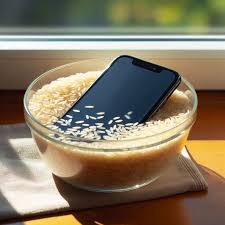
It happens in slow motion. You’re lounging by the pool in Jumeirah, or perhaps enjoying a coffee in Al Barsha, and suddenly splash. Your heart sinks as your smartphone takes a dive into the water. For years, the “common knowledge” passed down through the digital grapevine was simple: grab a bag of uncooked white rice, bury the phone, and wait for the grain to work its magic. Actually, it is time to set the record straight once and for all. Putting your phone in rice is a myth that might be doing more harm than good to your expensive device.
In 2026, with sophisticated hardware like the iPhone 17 and Samsung Galaxy S26, the stakes are higher than ever. Instead of relying on kitchen staples, you need a scientific approach to save your logic board from the silent killer known as corrosion. In this guide, we will debunk the rice legend and show you the professional steps to revive a wet device.
The Science Behind the Myth: Why Rice Fails
The idea that rice “pulls” moisture out of a phone is based on the fact that rice is a desiccant. Indeed, it absorbs water from the air. However, the problem isn’t the humidity in the air; it is the liquid trapped deep inside the charging port, under the screen, and nestled between the motherboard components.
1. Rice is Not Efficient Enough for putting your phone in rice is a myth
Specifically, rice has a very low capacity for absorbing moisture compared to specialized materials. Scientific tests have shown that leaving a phone in the open air is actually more effective than burying it in a bowl of rice. Consequently, by sealing it in a container with rice, you are actually trapping the humidity inside the phone’s chassis, which accelerates the rusting process.
2. The Danger of Dust and Starch
Furthermore, rice is covered in fine starch and dust. If these tiny particles enter your phone’s speakers or charging port, they mix with the water to create a thick, sticky paste. This paste hardens on the motherboard, making it nearly impossible for a technician to clean later. Instead of drying your phone, you are effectively “seasoning” its internal circuitry with debris.
What NOT to Do When Liquid Damage Strikes
When panic sets in, we often make mistakes that turn a simple repair into a total loss. Rather than rushing, avoid these three critical errors:
- Don’t Turn It On: This is the most important rule. If water is touching an active circuit, it causes a short. Indeed, electricity and water are a lethal combination for microchips.
- Don’t Shake the Phone: Shaking the device might seem helpful, but it actually pushes the water deeper into the crevices of the internal components.
- Don’t Use a Hairdryer: The intense heat can melt the adhesive seals that provide water resistance. In addition, the air pressure can blow moisture further into the motherboard.
Milaaj Mobile and Laptop Repair Dubai: Professional Recovery
Even though you might follow every DIY step perfectly, liquid damage is a microscopic battle. Corrosion can begin within minutes of exposure. This is why Milaaj mobile and laptop repair Dubai offers specialized ultrasonic cleaning and diagnostic services to save your data and your hardware.
If your phone takes a swim, our team in Al Barsha provides:
- Speed Repairing: We prioritize liquid damage cases. The faster we open the device and neutralize the liquid, the higher the success rate.
- Part Quality: If a screen or battery is damaged by the liquid, we replace them with OEM-grade components to ensure your phone feels brand new again.
- Low Price: We believe in fair pricing. We provide a transparent quote after a thorough diagnostic, ensuring you don’t pay more than the phone’s value.
- Convenience: Don’t risk driving a damp phone around. Use our free pickup and delivery service across Dubai. We collect your device, treat it in our specialized lab, and bring it back to you.
The “Emergency Protocol”: What to Do Instead
If your phone gets wet, forget the pantry. Instead, follow this professional protocol to maximize the chances of a full recovery:
1. Power Down Immediately for putting your phone in rice is a myth
Currently, most phones are water-resistant (IP68), but this seal isn’t a guarantee. As a result, you must shut the phone down immediately to prevent an electrical short. If it’s already off, do not try to turn it on to “check if it works.”
2. Remove Accessories and SIM Trays
Specifically, remove your case, screen protector, and most importantly, the SIM card tray. Moreover, this opens up a small “vent” that allows air to circulate inside the device more freely.
3. Surface Dry with a Lint-Free Cloth
Use a microfiber cloth or a highly absorbent towel to pat the exterior dry. Indeed, you want to remove all standing water from the surface before it has a chance to seep in further.
4. Position it for Airflow for putting your phone in rice is a myth
Instead of a bag of rice, place your phone in a well-ventilated area. Ideally, place it in front of a fan or a cool-air vent. Furthermore, keep the charging port facing downward so gravity can help pull moisture out of the main entry point.
Why Professional Cleaning is the Only Real Fix
Actually, the real danger of liquid damage isn’t the water itself it’s the minerals left behind once the water evaporates. Whether it’s salt from the Arabian Gulf or chlorine from a pool, these minerals create a conductive crust on the motherboard.
As a result, even if your phone works for a day or two after “drying” in rice, it will eventually fail as the corrosion eats through the delicate copper traces. Therefore, a professional technician must open the device and use an ultrasonic cleaner with specialized chemicals to strip away these minerals before they cause permanent damage.
FAQ: putting your phone in rice is a myth
1. Is it okay to use silica gel packets instead of rice?
Actually, yes. Silica gel (those little packets found in shoe boxes) is a much better desiccant than rice. However, it still cannot reach the water trapped deep inside the hardware. It is a better temporary measure, but not a permanent fix.
2. My phone is “Water Resistant” why do I need to worry?
Specifically, water resistance is a rating for “fresh” water under perfect conditions. Chemicals like salt or soap degrade the rubber gaskets over time. Indeed, many users find their “waterproof” phone dies after a simple drop in a sink because the seals have aged.
3. Can I use a vacuum cleaner to suck the water out?
Technically, a vacuum is better than a hairdryer because it pulls air out rather than blowing it in. Nevertheless, you must be extremely careful not to create static electricity, which can fry the sensors.
4. How long should I wait before turning it back on?
Usually, technicians recommend waiting at least 48 to 72 hours. But, the safest bet is to have it inspected professionally first. Turning it on too early is the #1 cause of “dead” phones.
5. What if I dropped my phone in salt water?
This is a true emergency. Saltwater is extremely corrosive and conductive. In that case, turn it off and get it to Milaaj immediately. Every hour counts when salt is involved.
Final Thoughts: putting your phone in rice is a myth
In conclusion, the rice myth is a relic of the past that we should leave behind. Your smartphone is a marvel of 2026 engineering, and it deserves better than a bowl of grain. As a result of modern construction, liquid damage requires a modern solution. Therefore, stick to the air-drying method and get your device to a professional lab as soon as possible.
Get professional Mobile Phone repair services with expert technicians ensuring top-quality results.
Instead of trying random recovery apps, always rely on certified software or trusted repair centers like Milaaj for secure data restoration.
Back in your hands faster: Enjoy rapid, reliable doorstep delivery for every device we service or sell.
Sell your old iPhone with confidence and get the best value instantly.
📍 Visit Any Milaaj Branch in Dubai
🔹 Bur Dubai
Milaaj Mobile and Laptop Repair Dubai
📞 055 258 8477
🔗 Google Maps
🔹 Al Barsha
Milaaj Mobiles and Laptop Repair Al Barsha
📞 052 596 2846
🔗 Google Maps
🔹 Al Barsha 3
Milaaj Mobiles and Gaming Store
📞 052 3405 814
🔗 Google Maps
🔹 Al Nuaimiya
Milaaj Mobiles and Laptops Ajman
📞 055 788 9654
🔗 Google Maps
📧 Email: support@milaaj.com
🕒 Operating Hours: Monday – Sunday




Leave a Reply