
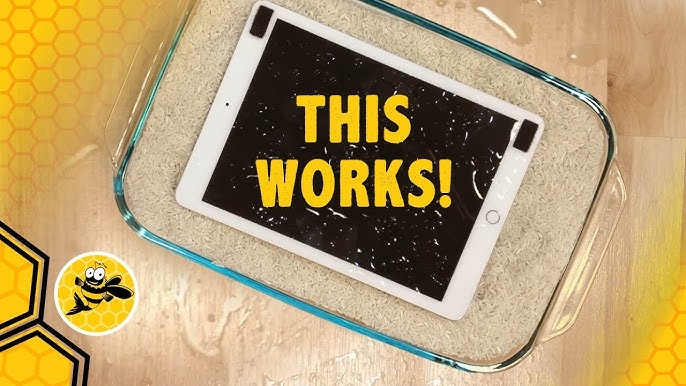
When an iPad comes into contact with water, panic often sets in. Many users immediately turn to a popular myth placing the device in a bowl of rice. While this method is widely shared online, the truth is that rice doesn’t fix iPad’s water damage. In fact, relying on rice can delay proper repair and cause more harm over time.
However, all hope is not lost. Why rice doesn’t fix iPad’s liquid damage becomes clear once you understand how liquid affects internal components. Therefore, choosing real, professional solutions is the safest way to restore functionality, protect data, and avoid permanent damage. In this detailed guide, we explain why rice fails, what actually happens inside a water-damaged iPad, and which expert repair methods truly work.
Why Rice Doesn’t Fix iPad’s Water Damage
Although rice is commonly recommended, it is not an effective repair method. Why rice doesn’t fix iPad’s liquid damage lies in the way moisture spreads inside modern devices.
Rice Only Absorbs Surface Moisture
First of all, rice can only absorb moisture present on the surface. Unfortunately, water quickly seeps deep into the iPad’s internal layers, including logic boards, connectors, and chips areas rice cannot reach.
Moisture Trapped Inside the iPad
Moreover, even if the exterior feels dry, moisture often remains trapped under shields and components. As a result, corrosion continues silently, leading to delayed failures.
Rice Can Introduce Dust and Particles
Additionally, rice grains release fine dust that can enter ports and speakers. This debris may cause blockages, further worsening the damage.
Therefore, rice doesn’t fix iPad’s liquid damage, and relying on it can give a false sense of security.
What Really Happens When an iPad Gets Wet
To understand why rice doesn’t fix iPad’s liquid damage, it’s important to know what liquid actually does inside the device.
Short Circuits Begin Immediately
As soon as water contacts internal circuits, electrical short circuits may occur. Even if the iPad turns on initially, internal damage may already be underway.
Corrosion Develops Over Time for Rice Doesn’t Fix iPad’s Water Damage
Furthermore, minerals in water react with metal components, causing corrosion. Over time, this corrosion spreads, damaging connections and chips permanently.
Battery and Display Risks for Rice Doesn’t Fix iPad’s Water Damage
Liquid exposure can also affect the battery, increasing the risk of swelling or overheating. In addition, water under the display may cause dark spots, flickering, or complete screen failure.
Common Myths About Fixing iPad Water Damage
Many misconceptions surround water damage repair. However, understanding the truth can save your device.
1: Rice Completely Dries the Device
In reality, rice cannot dry internal components thoroughly.
2: If the iPad Turns On, It’s Safe
Although the iPad may power on, internal corrosion can still cause sudden failure later.
3: Waiting Improves the Outcome
On the contrary, waiting allows corrosion to worsen. Therefore, early action is crucial.
What to Do Immediately After iPad Water Damage
Instead of using rice, follow these safer steps.
Turn Off the iPad Immediately for Rice Doesn’t Fix iPad’s Water Damage
First and foremost, power off the device to prevent short circuits.
Avoid Charging or Turning It On for Rice Doesn’t Fix iPad’s Water Damage
Charging a wet iPad significantly increases damage risk.
Gently Dry the Exterior for Rice Doesn’t Fix iPad’s Water Damage
Use a soft cloth to remove surface moisture only.
Seek Professional Repair Quickly for Rice Doesn’t Fix iPad’s Water Damage
Most importantly, consult professionals as soon as possible.
Real Solutions That Work for iPad Water Damage
Unlike rice, professional repair methods address the root of the problem.
Professional Disassembly and Inspection
Technicians carefully open the iPad to assess internal damage. This step allows them to identify affected areas accurately.
Ultrasonic Cleaning for Corrosion Removal
One of the most effective solutions involves ultrasonic cleaning. This process removes corrosion and residue from microscopic components.
Component-Level Repair
Damaged connectors, chips, or screens are repaired or replaced as needed. Consequently, functionality is restored safely.
Battery Safety Checks for Rice Doesn’t Fix iPad’s Water Damage
Professionals also test the battery to ensure it remains stable and safe after liquid exposure.
Why DIY Fixes Often Make Things Worse
Although DIY solutions may seem tempting, they often cause irreversible damage.
Improper Drying Methods
Hair dryers or heat guns can warp internal components.
Opening the iPad Without Proper Tools
Untrained handling can damage connectors and cables.
Using Unverified Chemicals
Alcohol or sprays may damage protective coatings.
Thus, why rice doesn’t fix iPad’s liquid damage also highlights why unprofessional methods should be avoided.
Signs Your iPad Needs Professional Water Damage Repair
If you notice any of the following symptoms, professional help is essential.
- iPad not turning on
- Screen flickering or dark patches
- Touch not responding
- Overheating or battery draining fast
- Audio or camera not working
Even if symptoms appear days later, internal corrosion may already be spreading.
Why Professional Repair Is the Best Choice
Choosing expert repair offers clear advantages.
Accurate Diagnosis for Rice Doesn’t Fix iPad’s Water Damage
Professionals identify both visible and hidden damage.
Advanced Repair Tools
Specialized equipment ensures safe cleaning and repair.
Higher Recovery Success Rate
Early professional intervention significantly improves repair outcomes.
Data Protection for Rice Doesn’t Fix iPad’s Water Damage
Experts focus on preserving your data whenever possible.
Milaaj Mobile Repair: Trusted iPad Water Damage Solutions in Dubai
When dealing with water damage, choosing the right repair service matters. Milaaj mobile and laptop repair Dubai provides professional, reliable solutions for water-damaged iPads using advanced repair techniques.
Low-Price iPad Water Damage Repair
Affordable pricing ensures high-quality repair without unnecessary costs.
Fast Turnaround Time
Quick diagnosis and efficient repair reduce downtime.
High-Quality Parts and Equipment
Only premium-quality components and professional tools are used.
Convenience and Customer Support
Easy consultations, transparent pricing, and expert guidance ensure a smooth repair experience.
How to Prevent Future Rice Doesn’t Fix iPad’s Water Damage
Prevention is always better than repair.
Use Protective Cases for Rice Doesn’t Fix iPad’s Water Damage
Water-resistant cases add an extra layer of safety.
Avoid Using iPads Near Liquids
Keep devices away from pools, kitchens, and bathrooms.
Act Fast If Accidents Happen
Immediate professional attention prevents long-term damage.
FAQs About Why Rice Doesn’t Fix iPad’s Water Damage
Why doesn’t rice fix iPad’s liquid damage?
Rice cannot remove internal moisture or stop corrosion inside the iPad.
Can an iPad work after water damage if kept in rice?
It may work temporarily, but hidden damage often causes later failure.
How soon should an iPad be repaired after water exposure?
Ideally within 24 hours for the best recovery chances.
Is data recoverable from a water-damaged iPad?
In many cases, yes especially with early professional repair.
Is professional repair expensive?
Professional repair is often cost-effective compared to replacing the device.
Final Thoughts: Rice Doesn’t Fix iPad’s Water Damage
Although rice is a popular home remedy, why rice doesn’t fix iPad’s liquid damage becomes obvious when you understand how liquid affects internal components. Rice cannot stop corrosion, remove trapped moisture, or repair damaged circuits. Therefore, relying on rice may actually reduce your chances of successful recovery.
Instead, acting quickly and choosing professional repair solutions ensures safety, reliability, and long-lasting performance. If your iPad has suffered water damage, avoiding myths and trusting expert repair is the smartest way to protect your device and data.
Get professional iPad repair services with expert technicians ensuring top-quality results.
Instead of trying random recovery apps, always rely on certified software or trusted repair centers like Milaaj for secure data restoration.
Enjoy quick and reliable home delivery for your repaired or purchased devices.
Sell your old iPad with confidence and get the best value instantly.
📍 Visit Any Milaaj Branch in Dubai
🔹 Bur Dubai
Milaaj Mobile and Laptop Repair Dubai
📞 055 258 8477
🔗 Google Maps
🔹 Al Barsha
Milaaj Mobiles and Laptop Repair Al Barsha
📞 052 596 2846
🔗 Google Maps
🔹 Al Barsha 3
Milaaj Mobiles and Gaming Store
📞 052 3405 814
🔗 Google Maps
🔹 Al Nuaimiya
Milaaj Mobiles and Laptops Ajman
📞 055 788 9654
🔗 Google Maps
📧 Email: support@milaaj.com
🕒 Operating Hours: Monday – Sunday



Leave a Reply