
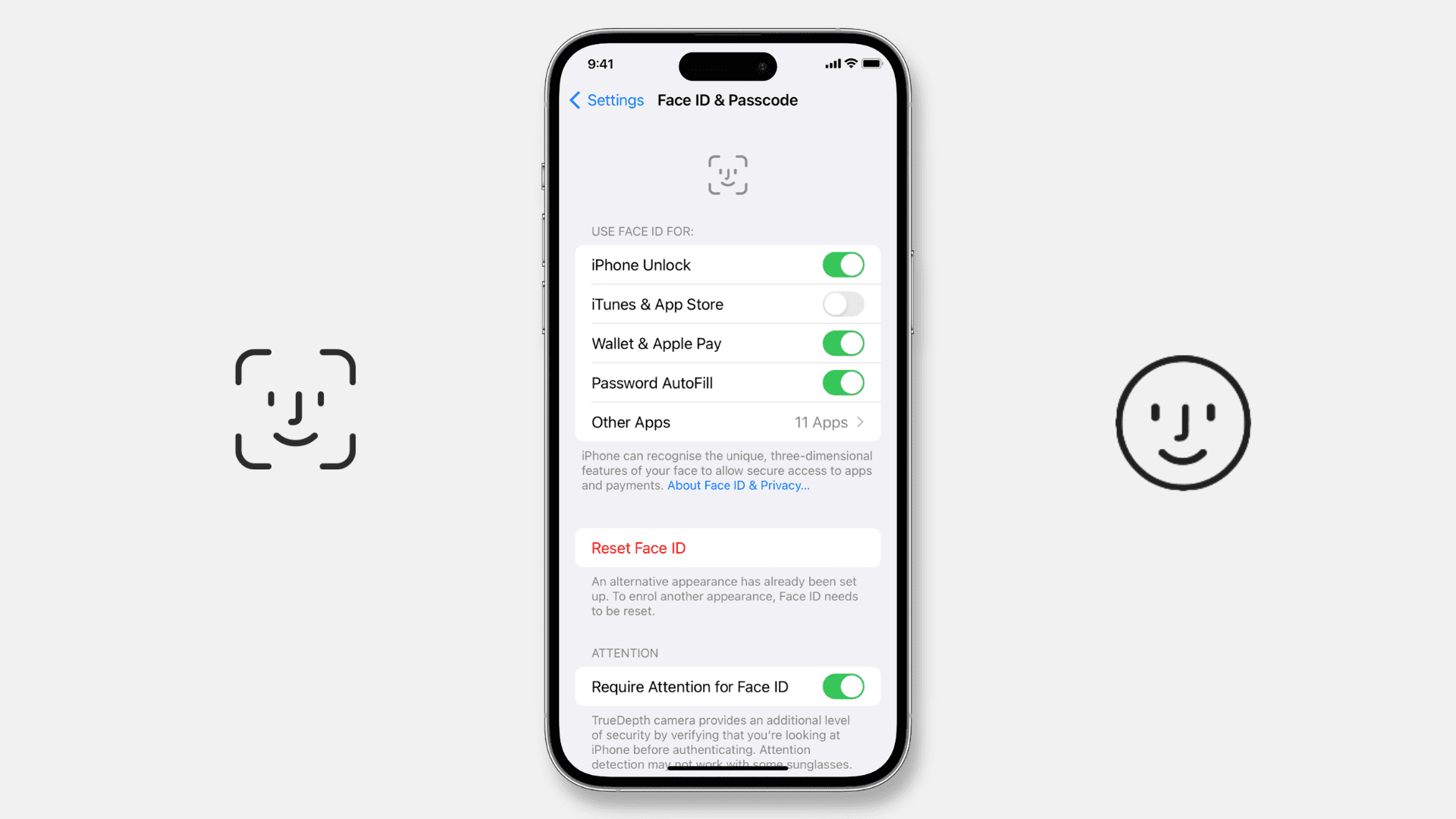
Few things are as frustrating as your iPhone 15 failing to recognize your face when you’re trying to pay for a coffee or quickly check a message. Since Face ID technology has become the primary gateway to our digital lives, a malfunction feels like a major security and convenience hurdle. If you are experiencing Face ID not working on iPhone 15, you might be wondering if it’s a simple software glitch or a hardware failure of the sophisticated TrueDepth camera system.
Living or working in the busy Bur Dubai district means you need your tech to work seamlessly. Whether you’re navigating the souks or heading to a business meeting, a locked phone is the last thing you need. This guide will walk you through essential troubleshooting steps and professional repair solutions available right here in the heart of the city.
Why Face ID Might Fail on Your iPhone 15
To fix the problem, we first need to understand the mechanics. The iPhone 15 utilizes a complex array of sensors, including a Dot Projector, Flood Illuminator, and Infrared Camera. If any of these “talk” to the A16 or A17 Bionic chip incorrectly, the system disables biometric security for your protection.
1. Software Conflicts and Updates for Face ID not working on iPhone 15
Sometimes, the issue isn’t hardware at all. A buggy iOS update or a background process crash can cause the TrueDepth camera to stop responding. If you see a message saying “Face ID Is Not Available,” it often points toward a software communication error.
2. Physical Obstructions for Face ID not working on iPhone 15
It sounds simple, but even the slightest bit of “Dubai dust” or a smudge from your fingers can block the infrared sensors. Additionally, third-party screen protectors that aren’t perfectly aligned can interfere with the Dot Projector, causing the system to fail the “depth” check.
3. Hardware or Liquid Damage for Face ID not working on iPhone 15
The TrueDepth camera is extremely sensitive to impacts and moisture. Even if your screen isn’t cracked, a hard drop can misalign the internal sensors. Furthermore, while the iPhone 15 is water-resistant, steam or high humidity can sometimes seep into the top earpiece area, short-circuiting the Face ID flex cable.
Quick Troubleshooting for Face ID Not Working on iPhone 15
Before seeking professional help, try these five steps to see if you can revive the system yourself.
Step 1: Clean the TrueDepth Sensor Area
Use a clean, dry microfiber cloth to wipe the top “Dynamic Island” area of your iPhone 15. Ensure there is no oil, dust, or lint covering the sensors.
Step 2: Check for iOS Updates
Go to Settings > General > Software Update. Apple frequently releases patches for known biometric bugs. If a fix is available, installing it might solve your Face ID not working on iPhone 15 issues instantly.
Step 3: Reset Face ID Settings
Try a fresh start. Go to Settings > Face ID & Passcode and tap Reset Face ID. Then, try to set it up again in a well-lit room. If the phone tells you to “Move iPhone lower” or “higher” repeatedly without capturing your face, this is a strong indicator of a hardware sensor failure.
Step 4: Toggle “Require Attention”
If you find that Face ID works intermittently, go to your settings and toggle off Require Attention for Face ID. This makes the sensor less strict about your eye contact, which can help if the sensors are slightly out of alignment.
Professional Repair Solutions in Bur Dubai
If your DIY efforts haven’t worked, it’s likely that your TrueDepth camera assembly or the associated flex cable needs expert attention. This is a high-precision job because the Face ID sensors are cryptographically paired to your motherboard for security.
Milaaj Mobile and Laptop Repair Dubai: Your Biometric Experts
When it comes to delicate sensor work, you need a team that understands the intricate architecture of the latest Apple devices. Milaaj mobile and laptop repair Dubai is a trusted name for residents and commuters in Bur Dubai and Al Barsha.
- Low Price for High-End Repairs: We provide a transparent, low price for Face ID diagnostics and repairs, often saving you significantly compared to official replacement programs.
- Speed Repairing for the Busy Commuter: We know you can’t be without your phone. Our speed repairing protocol ensures that most sensor and flex cable issues are diagnosed and fixed within 24 to 48 hours.
- Convenience and Location: Whether you are near the Dubai Museum or the busy streets of Meena Bazaar, our central locations make us easy to reach. We also offer iPhone pickup and delivery for maximum convenience.
- Superior Part Quality: We use only original-grade components to ensure that once fixed, your Face ID is as fast and secure as the day you unboxed the phone.
- Expertise in TrueDepth Tech: Our technicians are specifically trained to handle the micro-soldering required for Face ID flex cable restoration, ensuring the biometric link to your processor remains intact.
FAQs: Face ID not working on iPhone 15
1. Can a cracked screen cause Face ID to stop working?
Yes. If a crack runs directly over the TrueDepth sensors in the Dynamic Island, it can refract the infrared light, making it impossible for the camera to read your face. In this case, a screen replacement is usually the fix.
2. Is Face ID repairable without replacing the whole phone?
In the past, Apple required a full device swap. However, in 2026, skilled technicians can often repair the specific flex cable or sensor module, preserving your data and saving you money.
3. Will I lose my data if I get my Face ID repaired?
At Milaaj, we prioritize data safety. A Face ID repair is a hardware-focused job and typically does not require a factory reset, so your photos and messages remain safe.
4. Why does Face ID work only in the dark (or only in daylight)?
This usually indicates that one specific part of the array like the Flood Illuminator is failing while the others are working. It definitely requires a professional diagnostic.
5. Does the iPhone 15 warranty cover Face ID failure?
If your phone is under a year old and has no signs of physical or liquid damage, it might be covered by Apple. However, for out-of-warranty or accidental damage, a professional repair lab is your best option.
Summary: Face ID not working on iPhone 15
Dealing with Face ID not working on iPhone 15 is a major inconvenience, but it doesn’t have to be a permanent problem. By following a logical troubleshooting path from cleaning the sensors to checking software you can rule out the easy fixes. When the problem is hardware-deep, the expert technicians in Bur Dubai are ready to help.
Don’t settle for entering your passcode dozens of times a day. Your iPhone 15 was designed for a futuristic, touchless experience ensure it stays that way.
Is your iPhone 15 failing to recognize you? Don’t wait for a total lockout. Contact Milaaj today for a professional Face ID diagnostic and get back to the convenience you deserve!
Get professional iPhone repair services with expert technicians ensuring top-quality results.
Back in your hands faster: Enjoy rapid, reliable doorstep delivery for every device we service or sell.
Sell your old iPhone with confidence and get the best value instantly.
📍 Visit Any Milaaj Branch in Dubai
🔹 Bur Dubai
Milaaj Mobile and Laptop Repair Dubai
📞 055 258 8477
🔗 Google Maps
🔹 Al Barsha
Milaaj Mobiles and Laptop Repair Al Barsha
📞 052 596 2846
🔗 Google Maps
🔹 Al Barsha 3
Milaaj Service Center Reef Mall
📞 052 3405 814
🔗 Google Maps
🔹 Al Nuaimiya
Milaaj Mobiles and Laptops Ajman
📞 055 788 9654
🔗 Google Maps
📧 Email: support@milaaj.com
🕒 Operating Hours: Monday – Sunday




Leave a Reply