
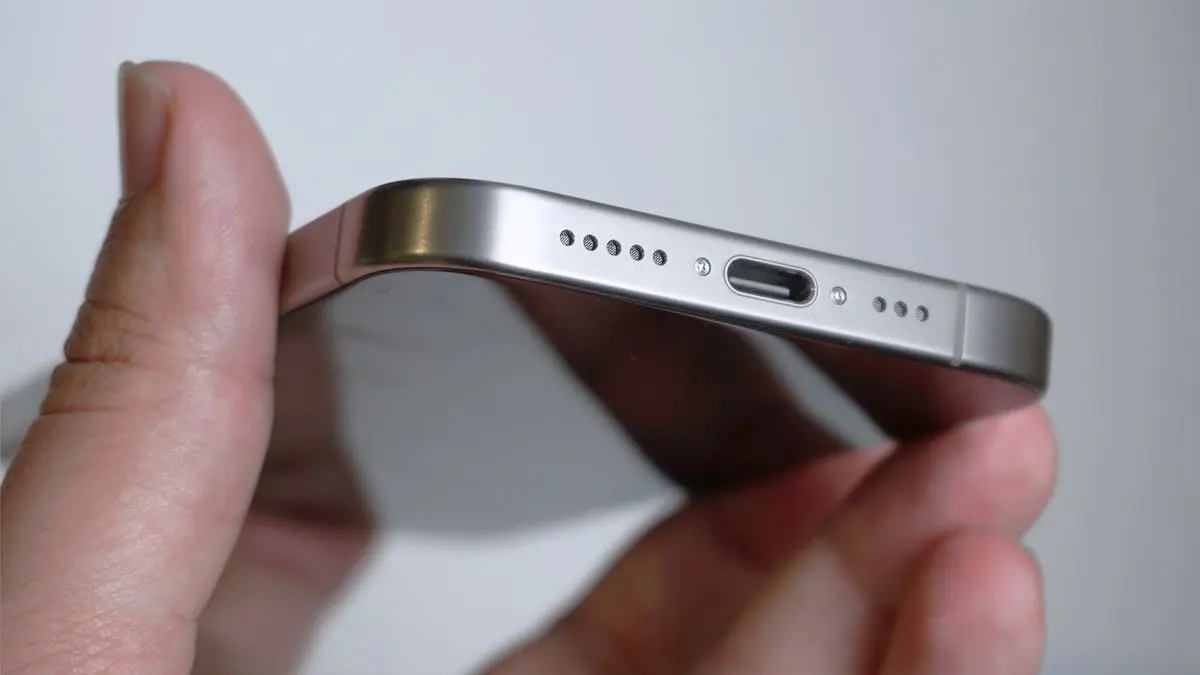
In the vibrant, fast-paced city of Dubai, your iPhone 16 is more than just a phone; it is your navigator, your digital wallet, and your connection to the world. But nothing brings that high-tech lifestyle to a halt faster than a device that refuses to charge. You plug in your USB-C cable, but the lightning bolt icon stays hidden. You wiggle the cord, flip it over, and try a different outlet, but the screen remains dark.
If you are facing iPhone 16 charging port issues, you are likely asking: is it just a bit of Dubai desert dust, or am I looking at serious hardware damage? In 2026, with the iPhone 16’s advanced USB-C 3.2 architecture and 3nm internal circuitry, the charging port is more sophisticated and delicate than ever. This guide will help you diagnose the problem and decide when it’s time for a simple clean and when you need professional intervention.
The Fine Line Between a Clog and a Break
The transition to USB-C has brought faster data speeds and universal compatibility, but it also introduced a larger physical opening that is prone to collecting pocket lint, dust, and debris. Because the USB-C port has a “center tongue” containing tiny pins, even a microscopic obstruction can prevent the cable from seating properly.
1. Signs of a Dusty or Clogged Port
If your phone still works but you notice these symptoms, you likely just have a debris problem:
- The “Squishy” Connection: The cable doesn’t “click” into place like it used to. It feels soft or spongy when you push it in.
- Partial Seating: You can see a tiny gap between the cable’s plastic housing and the phone’s frame.
- Intermittent Charging: The phone charges only when you apply pressure to the cable or hold it at a specific angle.
2. Signs of Physical Hardware Damage
Hardware damage is more serious and often involves the internal pins or the charging IC (U2 chip) on the logic board. Look for:
- Visible Corrosion: You see green or dark discoloration inside the port (often from humidity or a minor liquid spill).
- Loose Center Tongue: If you look inside with a flashlight and the middle part of the port looks bent or wobbly.
- “Accessory Not Supported”: Your iPhone 16 displays this error even when using an original Apple cable.
- Overheating: The bottom of the phone gets extremely hot the moment you plug it in.
Safe DIY Fixes for iPhone 16 Charging Port Issues
Before you panic, try these safe troubleshooting steps.
Note: Never use metal objects like needles or paperclips, as these can short-circuit the 30W fast-charging pins and cause permanent motherboard damage.
The “Gentle Clean” Method for iPhone 16 charging port issues
- Power Down: Always turn off your iPhone 16 before cleaning the port.
- Compressed Air: Use a can of compressed air to blow out loose particles. Hold the can upright to avoid spraying liquid propellant into the port.
- Non-Metallic Tool: Use a thin, wooden or plastic toothpick. Very gently sweep around the center tongue to lift out compacted lint.
- Inspect: Use a bright light to ensure the gold pins on the center tongue are clean and straight.
The “Cable Swap” Test for iPhone 16 charging port issues
In 2026, many USB-C cables can fail internally while looking perfect on the outside. Always test with a known-working MFi-certified or original Apple cable and a high-wattage power brick (at least 20W) before concluding the port is at fault.
Milaaj Mobile and Laptop Repair Dubai: Your Charging Solutions
If cleaning doesn’t solve the problem, or if your port feels physically loose, it is time for a professional assessment. Milaaj mobile and laptop repair Dubai is the city’s trusted destination for precision Apple repairs. Whether you are in Al Barsha, Bur Dubai, or the Marina, we have the specialized tools to restore your iPhone 16’s power.
Why Choose Milaaj for Your iPhone 16 Repair:
- Expertise in USB-C & 3nm Systems: Our technicians are specifically trained on the iPhone 16’s internal layout, ensuring that repairs to the charging assembly don’t affect your speakers or microphones.
- Low Price for Premium Quality: We believe in fair, transparent pricing. We offer a low price for port replacements and cleaning services, providing a much more affordable alternative to full-unit replacements at the mall.
- Speed Repairing for Your Busy Life: We know you need your phone back. Most iPhone 16 charging port repairs at our Dubai lab are completed within 60 to 90 minutes.
- Ultimate Convenience: Take advantage of our iPhone pickup and delivery service across Dubai. We’ll collect your device from your home or office and return it fully repaired and tested.
- Superior Part Quality: We use only Original-grade (OEM) charging flex cables. This ensures your fast-charging capabilities and data transfer speeds remain at factory standards.
FAQs About iPhone 16 charging port issues
1. Can I use a wireless charger if my port is broken?
Yes! If your physical port is damaged, you can use MagSafe or Qi2 wireless charging as a temporary workaround. However, this won’t fix the underlying hardware issue, and you won’t be able to sync data via cable.
2. Is the iPhone 16 charging port waterproof?
While the iPhone 16 has an IP68 rating, the port is still susceptible to corrosion if it comes into contact with salt water or chlorine. If your phone was recently wet, ensure the port is completely dry before plugging in a cable.
3. Why is my iPhone 16 charging so slowly?
If the port is dirty, it can create “resistance,” which slows down the power flow. It could also be that your phone has switched to “Slow Charge” mode because it detects a non-certified third-party cable.
4. Can a broken port damage my battery?
In short: yes. An unstable connection can cause “voltage ripples” that stress the Silicon-Anode battery, potentially leading to overheating or shortened battery lifespan.
5. How can I prevent port damage in the future?
Avoid using your phone while it is plugged in at a sharp angle. Also, consider using a protective case with a built-in port cover to keep out the fine Dubai dust.
Summary: iPhone 16 charging port issues
Navigating iPhone 16 charging port issues doesn’t have to be a nightmare. By distinguishing between a simple clog and genuine hardware damage, you can take the right steps to protect your investment. Most of the time, a professional cleaning or a quick part replacement is all it takes to get your digital life back on track.
In a city as advanced as Dubai, your technology should never hold you back. Whether it’s a quick lint removal or a precision micro-soldering job, ensure your iPhone 16 gets the high-standard care it deserves.
Is your iPhone 16 refusing to charge or feeling loose at the bottom? Don’t force the cable and risk more damage! Contact Milaaj today for a professional diagnostic and a fast, high-quality repair that gets you back to 100%!
Get professional iPhone repair services with expert technicians ensuring top-quality results.
Back in your hands faster: Enjoy rapid, reliable doorstep delivery for every device we service or sell.
Sell your old iPhone with confidence and get the best value instantly.
📍 Visit Any Milaaj Branch in Dubai
🔹 Bur Dubai
Milaaj Mobile and Laptop Repair Dubai
📞 055 258 8477
🔗 Google Maps
🔹 Al Barsha
Milaaj Mobiles and Laptop Repair Al Barsha
📞 052 596 2846
🔗 Google Maps
🔹 Al Barsha 3
Milaaj Service Center Reef Mall
📞 052 3405 814
🔗 Google Maps
🔹 Al Nuaimiya
Milaaj Mobiles and Laptops Ajman
📞 055 788 9654
🔗 Google Maps
📧 Email: support@milaaj.com
🕒 Operating Hours: Monday – Sunday




Leave a Reply