
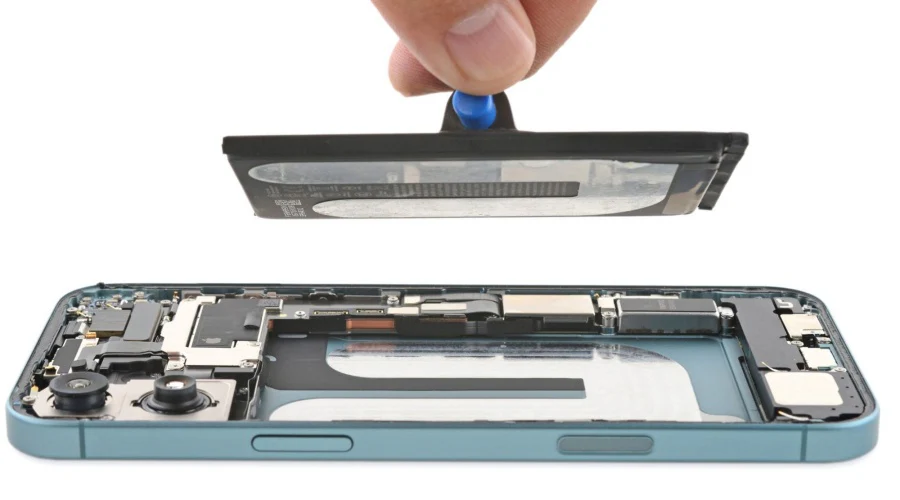
The iPhone 16 is one of Apple’s most advanced smartphones, built with powerful performance, improved cameras, and a refined OLED display system. But even with premium hardware, real-world usage, accidental drops, overheating, charging stress, and software bugs can still lead to repair needs.
This complete guide explains the most common iPhone 16 problems, symptoms, troubleshooting steps, repair solutions, and when professional iPhone 16 repair becomes necessary. It also helps you understand when a quick fix is enough and when hardware repair is the safer option.
Common iPhone 16 Problems Users Face
Even though Apple improves durability each year, these issues are still widely reported by users:
1. Cracked or Unresponsive Screen
A drop on hard surfaces can cause:
- Cracked glass
- Touch not responding properly
- Green lines or flickering display
- Black screen after impact
The iPhone 16 uses a high-end OLED panel, so even small cracks can affect display performance.
2. iPhone 16 Battery Drain Issues
Many users notice:
- Fast battery drop during normal use
- Phone heating while charging
- Battery percentage jumping suddenly
- Device shutting down at 10–20%
This usually happens due to:
- Battery aging
- Background app load
- iOS bugs after updates
- Heavy usage like gaming or GPS
3. Charging Problems
Common symptoms include:
- Slow charging
- Charging only at certain angles
- Cable not detected
- Wireless charging failure
This may indicate a dirty charging port, damaged connector, or battery-related fault.
4. Camera Not Working Properly
Users report:
- Blurry images
- Camera app freezing
- Black screen in camera mode
- Autofocus failure
This can happen due to lens damage, software issues, or internal sensor failure.
5. Overheating Issues
iPhone 16 overheating may occur during:
- Gaming or video recording
- Charging while using apps
- Hot outdoor environments
Heat can reduce performance and damage battery health over time.
6. Water or Liquid Damage
Even though the iPhone 16 has water resistance, it is not waterproof.
Symptoms include:
- Sudden shutdown
- Face ID failure
- Speaker distortion
- Charging issues after exposure
7. Software Glitches and Lag
Some users experience:
- App crashing
- Frozen screen
- Slow performance
- iOS bugs after updates
Quick iPhone 16 Troubleshooting Fixes
Before visiting a repair center, you can try these safe steps:
Restart Your Device
A simple restart clears temporary system glitches.
Update iOS
Go to Settings → General → Software Update
New updates often fix performance and battery issues.
Check Battery Usage
Identify power-hungry apps and restrict background activity.
Clean Charging Port
Dust or lint can block proper charging connection.
Reset Settings (Without Data Loss)
This fixes system bugs without deleting personal files.
When iPhone 16 Needs Professional Repair
If the problem continues after basic troubleshooting, you likely need hardware-level repair.
You should visit a technician if:
- Screen has lines, dead pixels, or touch failure
- Battery drains abnormally fast even after optimization
- Device does not turn on at all
- Charging port is physically damaged
- Water exposure occurred recently
- Camera or Face ID stops working
Modern iPhone components are tightly integrated, so improper DIY repair can permanently damage the device.
DIY vs Professional iPhone 16 Repair
Why DIY Repair Is Risky
- Face ID and TrueDepth system can be damaged easily
- OLED screen is fragile and expensive
- Opening device breaks waterproof seal
- Incorrect handling may damage motherboard
Why Professional Repair Is Better
- Accurate diagnostics using repair tools
- Safe part replacement without data loss
- High-quality components for long-term performance
- Proper calibration after repair
iPhone 16 Repair Process (What Actually Happens)
A professional repair usually follows these steps:
1. Diagnosis
Technicians inspect hardware and software to identify root cause.
2. Issue Confirmation
You receive a clear explanation of the problem and repair cost.
3. Repair Work
Faulty parts like screen, battery, or charging port are replaced or repaired.
4. Testing Phase
Device is tested for:
- Display quality
- Battery performance
- Camera clarity
- Charging stability
5. Final Quality Check
Ensures the phone performs like expected before return.
iPhone 16 Repair Cost Factors
Repair pricing depends on:
- Type of damage
- Replacement parts required
- Severity of internal issues
- Whether motherboard repair is needed
Screen and battery repairs are usually affordable, while logic board issues cost more.
Data Safety During iPhone 16 Repair
Most standard repairs do not affect data. However:
- Always back up your device if possible
- Avoid using the phone after severe water damage
- Professional repair centers prioritize data safety
If data is already lost or the device is dead, expert data recovery services in Dubai can often help retrieve files.
Prevent Future iPhone 16 Damage
You can reduce repair needs by following simple habits:
- Use a shockproof case and tempered glass
- Avoid overheating during charging
- Keep away from liquids and moisture
- Use original or certified chargers
- Update iOS regularly
FAQs – iPhone 16 Repair
1. How long does iPhone 16 repair take?
Most repairs like screen or battery replacement take a few hours. Complex issues may take 1–2 days.
2. Can a completely dead iPhone 16 be repaired?
Yes, if the motherboard and storage are intact, recovery is often possible.
3. Will Face ID stop working after screen replacement?
Not if repaired properly using correct calibration and tools.
4. Is iPhone 16 water damage permanent?
Not always. Quick professional cleaning can often save the device.
5. Is it better to repair or replace an iPhone 16?
If damage is limited to screen or battery, repair is more cost-effective.
Final Thoughts
iPhone 16 issues are common, but most are fully repairable with the right approach. From screen damage and battery drain to charging issues and water exposure, timely repair prevents further complications.
Milaaj Mobile and Laptop Repair Dubai provides trusted solutions for iPhone repair in Dubai, quick diagnostics, and reliable servicing.
👉 If your device is beyond repair, you can also sell your iPhone for instant cash and upgrade easily.



Leave a Reply