
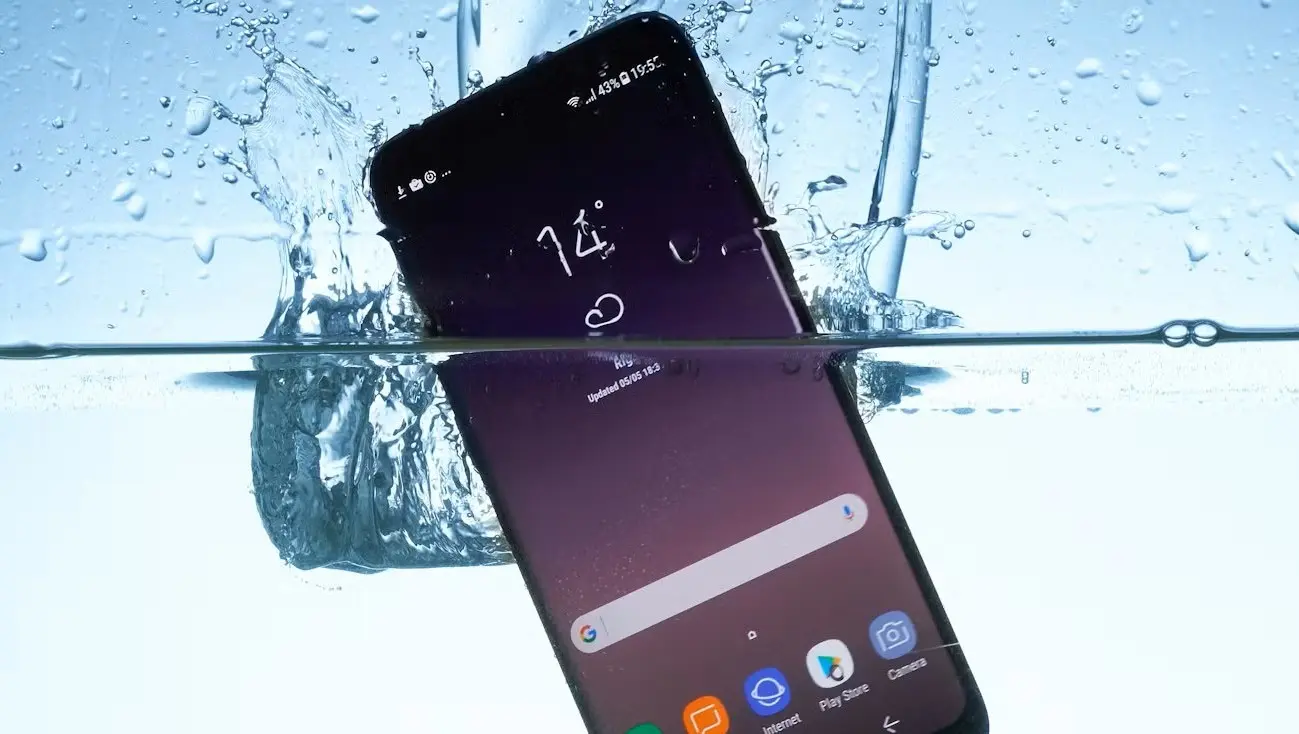
Accidents happen suddenly, and dropping your phone into water can be one of the most stressful moments for any smartphone user. If your Samsung dropped in water, acting quickly can make the difference between full recovery and permanent damage. Although many modern Samsung phones offer some level of water resistance, that protection is limited and not guaranteed forever. Therefore, understanding what to do immediately after water exposure is absolutely critical.
Fortunately, water damage does not always mean your device is beyond repair. In fact, when you take the right steps early, you can significantly reduce internal corrosion and data loss. In this comprehensive guide, we explain what happens when a Samsung dropped in water, the immediate actions you should take, common mistakes to avoid, professional repair options, and preventive measures to protect your phone in the future.
What Happens Internally When a Samsung Dropped in Water?
When a Samsung dropped in water, moisture quickly seeps into charging ports, speaker grills, buttons, and internal circuits. As a result, water can short-circuit delicate components on the logic board. Even worse, minerals in water cause corrosion over time, which continues damaging the phone long after it appears dry.
Moreover, saltwater, pool water, and soapy liquids are far more dangerous than clean freshwater. Consequently, the longer water remains inside your device, the higher the risk of irreversible damage.
Immediate Steps to Take When Your Samsung Dropped in Water
1. Turn Off the Phone Immediately
First and foremost, power off the device right away. Keeping the phone on allows electricity to flow through wet circuits, which significantly increases damage. Therefore, even if the screen still works, shut it down immediately.
2. Remove Accessories and SIM Card
Next, remove the SIM card, memory card, case, and any connected accessories. This step allows airflow and prevents trapped moisture from worsening the damage.
3. Gently Dry the Exterior
Afterward, use a soft, lint-free cloth to wipe the phone gently. However, avoid shaking or tapping the device, as this may push water deeper inside.
4. Keep the Phone Upright
Keeping the phone upright helps gravity drain water from ports and speakers. As a result, internal moisture has a better chance of escaping naturally.
What NOT to Do After a Samsung Dropped in Water
Do Not Use a Hair Dryer
Although it seems helpful, heat pushes moisture deeper into the phone and damages internal adhesives. Therefore, avoid heat sources entirely.
Do Not Charge the Phone
Charging a wet phone is one of the most common causes of permanent damage. Consequently, wait until a professional confirms the device is completely dry.
Do Not Put It in Rice
Despite popular belief, rice does not remove internal moisture effectively. In fact, rice dust can clog ports and cause additional issues.
Signs of Water Damage in Samsung Phones
If your Samsung dropped in water, you may notice the following symptoms:
- Screen flickering or black display
- Distorted or muffled sound
- Charging issues or overheating
- Random shutdowns or boot loops
- Camera fogging or blurry images
Therefore, even if the phone turns on, these warning signs indicate internal water damage that requires attention.
How Long Does Water Damage Take to Appear?
Sometimes, damage is immediate. However, in many cases, corrosion develops gradually over days or weeks. As a result, your phone may work initially and fail later. This delayed failure is why professional inspection is strongly recommended after any water exposure.
Can a Water-Resistant Samsung Still Get Damaged?
Yes, absolutely. Although Samsung advertises IP ratings, water resistance degrades over time due to drops, heat, and wear. Therefore, if your Samsung dropped in water, you should never assume it is safe even if it was advertised as water-resistant.
Professional Water Damage Repair: What Experts Do Differently
Advanced Internal Cleaning
Repair technicians disassemble the phone and use ultrasonic cleaning to remove corrosion at a microscopic level. As a result, hidden damage is properly addressed.
Logic Board Inspection
Technicians carefully inspect the motherboard for short circuits, corrosion, and damaged chips. Therefore, they prevent long-term failures that DIY methods miss.
Component-Level Repair
In severe cases, experts replace damaged connectors, charging ICs, or display components, restoring full functionality safely.
Why Professional Help Matters After a Samsung Dropped in Water
While basic drying steps help initially, they do not stop internal corrosion. Consequently, professional repair dramatically increases recovery success. With specialized tools and experience, technicians can protect your data and extend your phone’s lifespan.
This is where Milaaj mobile and laptop repair Dubai provides expert-level water damage diagnostics, safe internal cleaning, and reliable repairs to prevent permanent failure.
Data Safety After Water Exposure
If your Samsung dropped in water, data recovery becomes time-sensitive. The longer corrosion spreads, the higher the risk of data loss. Therefore, professional repair also protects photos, contacts, documents, and apps stored on your device.
Preventive Tips to Avoid Future Water Damage
- Use a waterproof case when near water
- Avoid charging in humid environments
- Keep ports clean and dry
- Do not rely solely on IP ratings
- Act immediately after any liquid exposure
As a result, these habits significantly reduce long-term damage risks.
When Is a Samsung Beyond Repair?
In rare cases, prolonged water exposure combined with delayed action may cause irreversible logic board damage. However, many phones considered “dead” can still be repaired or partially recovered by professionals. Therefore, never assume your device is beyond saving without expert evaluation.
FAQs: Samsung Dropped in Water
1. What should I do immediately if my Samsung phone is dropped in water?
First, turn off the phone immediately and remove it from the water. Then, remove the SIM card and accessories, gently dry the exterior, and avoid charging the device. Acting quickly can significantly reduce permanent water damage.
2. Can a water-resistant Samsung phone still get water damage?
Yes. Although many Samsung phones are water-resistant, they are not fully waterproof. Over time, seals weaken, and water can still enter the device, especially after drops, cracks, or prolonged exposure.
3. Is it safe to charge a Samsung phone after water exposure?
No. Charging a Samsung phone after it has been dropped in water can cause short circuits and serious internal damage. Always allow the device to dry fully and get it inspected before charging.
4. What are the common signs of water damage in Samsung phones?
Common symptoms include muffled sound, screen flickering, unresponsive touch, overheating, random shutdowns, charging issues, or corrosion near ports and buttons.
5. Does putting a Samsung phone in rice fix water damage?
No. Rice may absorb surface moisture, but it cannot remove internal liquid or corrosion. In fact, rice dust can enter ports and cause additional damage.
6. How long should I wait before turning on my Samsung phone after water exposure?
You should wait at least 24–48 hours. However, for best results, professional inspection is recommended before powering the phone back on.
Final Thoughts: Act Fast When a Samsung Dropped in Water
In conclusion, when a Samsung dropped in water, quick and correct action is the key to preventing permanent damage. Turning the phone off immediately, avoiding harmful myths, and seeking professional repair dramatically improve recovery chances. Although water damage is serious, it is often repairable when handled properly.
Most importantly, never wait. The sooner you respond, the better your chances of saving both your device and your valuable data.
Get professional Mobile Phone repair services with expert technicians ensuring top-quality results.
Instead of trying random recovery apps, always rely on certified software or trusted repair centers like Milaaj for secure data restoration.
Enjoy quick and reliable home delivery for your repaired or purchased devices.
Sell your old Phone with confidence and get the best value instantly.
📍 Visit Any Milaaj Branch in Dubai
🔹 Bur Dubai
Milaaj Mobile and Laptop Repair Dubai
📞 055 258 8477
🔗 Google Maps
🔹 Al Barsha
Milaaj Mobiles and Laptop Repair Al Barsha
📞 052 596 2846
🔗 Google Maps
🔹 Al Barsha 3
Milaaj Mobiles and Gaming Store
📞 052 3405 814
🔗 Google Maps
🔹 Al Nuaimiya
Milaaj Mobiles and Laptops Ajman
📞 055 788 9654
🔗 Google Maps
📧 Email: support@milaaj.com
🕒 Operating Hours: Monday – Sunday

Leave a Reply