
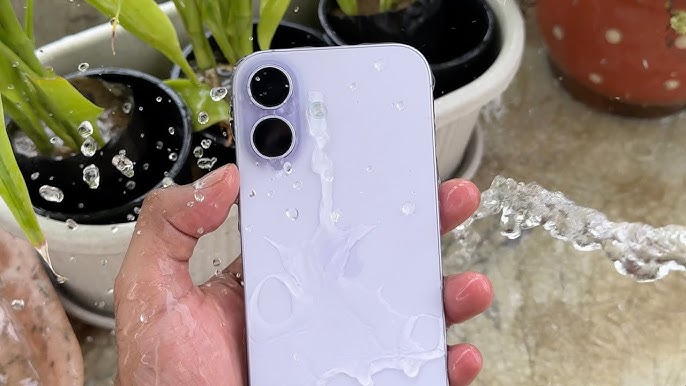
We’ve all had that heart-stopping moment. You’re lounging by the pool at a rooftop in Downtown Dubai, or maybe you’re catching a quick sunset at Kite Beach, and suddenly splash. Your brand-new iPhone 17 takes an unplanned dive into the water. In 2026, Apple has pushed the boundaries of durability further than ever, but the term “waterproof” is still one of the most misunderstood concepts in the tech world. If you are wondering about the Water Resistance Ratings for iPhone 17, you aren’t just looking for a number; you’re looking for peace of mind.
In this comprehensive guide, we are going to dive deep into the technical specifications of the iPhone 17 lineup. From the standard model to the ultra-thin iPhone 17 Air and the powerhouse Pro Max, we’ll explore how these devices handle H2O. We will also break down the science of the IP68 rating, the impact of the new Grade 5 Titanium frame on seal integrity, and what you should do if your “water-resistant” phone starts acting strangely.
What Does IP68 Actually Mean for the iPhone 17?
When you look at the spec sheet for the iPhone 17 series, the headline figure is almost always the IP68 rating. To the average user, this sounds like a secret code, but it is actually an international standard for “Ingress Protection.”
The “6” – Dust Protection for Water Resistance Ratings for iPhone 17
The first digit refers to solid particles. A rating of 6 is the highest possible score, meaning the iPhone 17 is completely dust-tight. Whether you are dealing with the fine desert sand of the UAE or pocket lint, the internal A19 Pro chip and 2nm architecture are shielded behind airtight gaskets.
The “8” – Water Immersion for Water Resistance Ratings for iPhone 17
The second digit is where things get interesting. An 8 indicates that the device can withstand continuous immersion in water. For the iPhone 17, Apple has maintained its industry-leading standard: protection at a maximum depth of 6 meters for up to 30 minutes. However, it is vital to remember that these tests are conducted in “lab-fresh” conditions using pure, still water.
iPhone 17 Air vs. Pro Max: Does Size Affect the Seal?
With the 2026 lineup, Apple introduced a radical shift in design. The iPhone 17 Air is incredibly thin rumored to be around 5.5mm to 6mm. Many users naturally worry that a thinner phone means a weaker seal.
The Challenges of the “Air” Design for Water Resistance Ratings for iPhone 17
Achieving an IP68 rating on a device as thin as the iPhone 17 Air required a complete overhaul of the internal adhesive system. Apple utilized a new liquid-injected gasket technology that fills the microscopic gaps between the Tandem OLED display and the frame. Despite its slim profile, the Air carries the same water resistance rating as its bulkier siblings.
The Pro Max and Pressure Resistance for Water Resistance Ratings for iPhone 17
On the other end of the spectrum, the iPhone 17 Pro Max uses its larger Grade 5 Titanium frame to offer slightly better structural rigidity. While the rating remains the same (6m for 30 min), the Pro Max is generally more resilient to “dynamic pressure” the force created when a phone hits the water at high speed or is held against a running tap.
Why “Water Resistant” Isn’t “Waterproof”
This is the most important distinction in this guide. No smartphone in 2026 is truly 100% waterproof. The Water Resistance Ratings for iPhone 17 describe a temporary state of protection that can degrade over time.
- Chemical Erosion: Chlorine in pools and salt in the Arabian Gulf are corrosive. They can eat away at the rubber seals over several months, eventually allowing moisture to seep in.
- Physical Wear and Tear: Every time you drop your phone, even if the screen doesn’t crack, the frame can suffer “micro-flexing.” This can create tiny gaps in the adhesive seal that water can exploit.
- Steam and Heat: The IP68 rating does not cover steam. If you take your iPhone 17 into a hot shower or a sauna in Al Barsha, the steam can bypass the gaskets and condense directly on the 2nm motherboard, causing instant short circuits.
What to Do If Your iPhone 17 Gets Wet
If your device takes a plunge, don’t panic, but don’t ignore it either. Follow these steps to ensure the Water Resistance Ratings for iPhone 17 do their job:
- Rinse it off: If it was submerged in salt water or a sugary drink, give it a quick rinse with fresh, clean tap water.
- Dry the exterior: Use a lint-free microfiber cloth to pat the device dry.
- Eject the water: Use the “Water Eject” shortcut or a similar app to play a specific frequency that vibrates the speaker diaphragms, pushing droplets out of the grilles.
- Avoid the Rice Myth: Never put your phone in rice. Rice dust can enter the USB-C 3.5 port and cause more harm than good. Instead, leave the phone in an area with good airflow and a cool fan.
Milaaj Mobile and Laptop Repair Dubai: Your Post-Splash Partners
Even with the best engineering, water is persistent. If you’ve noticed your iPhone 17 screen flickering, the “Liquid Detected” warning won’t go away, or your speakers sound muffled after a swim, you need a professional diagnostic. Milaaj mobile and laptop repair Dubai is the region’s leading authority in water damage recovery and seal restoration.
Why Milaaj is the Trusted Choice in Al Barsha:
- Low Price Liquid Recovery: Water damage doesn’t have to mean a total loss. We offer a low price for professional ultrasonic cleaning, which removes minerals and corrosion from your logic board before they cause permanent damage.
- Speed Repairing for Urgent Cases: Time is of the essence with water. Our speed repairing protocol ensures that we prioritize “wet” phones, opening them up to dry the internal components before oxidation sets in.
- Unmatched Convenience: Located conveniently in Al Barsha 1, we are easy to reach for a quick checkup. If you are stuck at home, our iPhone pickup and delivery service means you don’t have to risk driving with a damaged device.
- Part Quality and Seal Restoration: If we have to open your iPhone 17, we don’t just fix the problem; we restore its protection. We use original-grade gaskets and specialized heat-press machines to ensure your Water Resistance Ratings for iPhone 17 are maintained after the repair.
- Expert Hardware Knowledge: Our technicians are experts in the 2nm architecture and the specific thermal requirements of the A19 Pro chip, ensuring your high-end tech is handled with precision.
FAQs: Water Resistance Ratings for iPhone 17
1. Can I take photos underwater with my iPhone 17?
Technically, the Water Resistance Ratings for iPhone 17 allow it, but we don’t recommend it. Pressing buttons underwater can break the seal, and the touchscreen rarely works correctly when wet. If you must, use a dedicated waterproof housing.
2. Does Apple’s warranty cover water damage?
No. Despite the IP68 rating, Apple (and most manufacturers) does not cover liquid damage under the standard one-year warranty. Internal “Liquid Contact Indicators” (LCIs) will turn red if moisture enters the chassis, voiding the warranty.
3. How long do the water-resistant seals last?
On average, the adhesive seals start to lose their effectiveness after 12 to 18 months of normal use. Heat and humidity in the UAE can accelerate this process.
4. What if my iPhone 17 was dropped before it got wet?
A drop often compromises the seal. If your phone has any dents or cracks, assume the water resistance is gone. In this case, even a small splash could be fatal to the internals.
5. Can Milaaj check if my phone is still water-resistant?
Yes! We use specialized pressure-testing equipment that can check if your iPhone 17 is airtight without actually putting it in water. This is a great “peace of mind” service for those who spend a lot of time near the pool.
Summary: Water Resistance Ratings for iPhone 17
The Water Resistance Ratings for iPhone 17 are a fantastic safety net, but they shouldn’t be treated as a green light for underwater adventures. The Grade 5 Titanium frame and Ceramic Shield 2 make the 2026 lineup incredibly tough, but the “IP68” label is a rating of resistance, not a guarantee of invincibility.
By understanding the limits of your tech and knowing how to respond when things get wet, you can keep your iPhone 17 running perfectly for years. Remember, the best way to handle water is to avoid it, but when the unexpected happens, having a reliable repair partner in Al Barsha can save your digital life.
Is your iPhone 17 showing signs of moisture damage, or are you worried that a recent drop has broken your waterproof seal? Contact Milaaj today for a professional pressure test and diagnostic! We’ll make sure your flagship stays protected, no matter what the Dubai weather throws at it.
Get professional iPhone repair services with expert technicians ensuring top-quality results.
Back in your hands faster: Enjoy rapid, reliable doorstep delivery for every device we service or sell.
Sell your old iPhone with confidence and get the best value instantly.
📍 Visit Any Milaaj Branch in Dubai
🔹 Bur Dubai
Milaaj Mobile and Laptop Repair Dubai
📞 055 258 8477
🔗 Google Maps
🔹 Al Barsha
Milaaj Mobiles and Laptop Repair Al Barsha
📞 052 596 2846
🔗 Google Maps
🔹 Al Barsha 3
Milaaj Service Center Reef Mall
📞 052 3405 814
🔗 Google Maps
🔹 Al Nuaimiya
Milaaj Mobiles and Laptops Ajman
📞 055 788 9654
🔗 Google Maps
📧 Email: support@milaaj.com
🕒 Operating Hours: Monday – Sunday




Leave a Reply